What is query language? SQL is Structured Query Language and you use it to query your database for data you are interested in. It does not have to do anything with your API. If you ever were working with big XML files you probably used XQuery or XPath, query languages designed to XML for data. There are specialized languages that are designed to work with APIs to query them for data. For example, you probably heard about GraphQL or even used it when you were working with some API.
I remember the day when I started writing the HLinq query language. It was weekend and I was experimenting with writing Single endpoints for Hamster Wheel. Single endpoints were almost done and next step was to write List endpoint. This would allow to get list of records of specific type. After I got single GET returns correct data for chosen record id, list should not be hard to implement. Then just create, update and delete. Basic CRUD API in Hamster Wheel would be finished. I was thrilled that I actually was able to do such thing.
Lately I was having a problem with some of my tests causing problems for other developers on the project I am working on. They were using Windows for their development while I am using Debian for my work. The application that was being tested was not designed for non Unix system - now rarely anybody is hosting they production code on Windows Server - everybody is using Unix for .net.
Usually in .NET world when you want to write generic code you use generic method or classes. But sometimes it is still not enough when you want to automate some things. I.e. you want to dynamically register in DI
all the classes that implements some interface. Probably, in this case, you would do something like that:
And it would be completely fine. Even if Reflection is pretty slow, your application would not be getting significantly slower because of that. Certainly you would not notice the slow down.
I released today first new Nuget package connected to my new project that I am working on for sometime: dynamically configurable, zero-downtime API, with low-code flows to write small pieces of logic - Hamster Wheel.
Custom implementation is usually only necessary if default, reference equality is not enough. In example:
entities value based equality value equality of deserialized objects custom comparisons based on other criterias public class ImaginaryNumber : IEquatable<ImaginaryNumber> { public double RealNumber { get; set; } public double ImaginaryUnit { get; set; } public override bool Equals(object obj) { return Equals(obj as ImaginaryNumber); } public bool Equals(ImaginaryNumber other) { return other != null && RealNumber == other.RealNumber && ImaginaryUnit == other.ImaginaryUnit; } public override int GetHashCode() { return HashCode.Combine(RealNumber, ImaginaryUnit); } }
Controller type inherits from ControllerBase and have Views support ControllerBase type is better suited for APIs Further read:
https://learn.microsoft.com/en-us/aspnet/core/web-api/?view=aspnetcore-6.0
default application server for .net cross platform best performance and memory utilization may not have some advanced features of HTTP.sys on Windows may be used with proxy server or as internet facing server Further read:
https://learn.microsoft.com/en-us/aspnet/core/fundamentals/servers/kestrel?view=aspnetcore-6.0
To handle exceptions on Controller/Action level Exception Filters are used.
[TypeFilter(typeof(SampleExceptionFilter))] public class ExceptionController : Controller Exception Filters are implemented using IExceptionFilter with OnExcetion method override to handle exceptions.
Exception Filters can be applied to Controller and Action level.
Further read:
https://learn.microsoft.com/en-us/aspnet/core/mvc/controllers/filters?view=aspnetcore-7.0#exception-filters https://learn.microsoft.com/en-us/dotnet/api/microsoft.aspnetcore.mvc.filters.iexceptionfilter?view=aspnetcore-7.0
To add global exception handling in ASP.NET Core just use configuration method:
app.UseExceptionHandler
https://learn.microsoft.com/en-us/aspnet/core/fundamentals/error-handling?view=aspnetcore-6.0#exception-handler-lambda
Pretty much everything. Default ASP.NET Core request handling pipeline is consisting of bunch of middlewares:
Authentication Authorization CORS HTTP Logging MVC Static Files other Whole list of built-in middlewares can be found here:
https://learn.microsoft.com/en-us/aspnet/core/fundamentals/middleware/?view=aspnetcore-7.0#built-in-middleware There is possibility to write custom middleware too.
app.Use(async(context,next)=>{// Do work that can write to the Response.awaitnext.Invoke();// Do logging or other work that doesn't write to the Response.});
Pure OWIN Middleware:
This rather would be used to integrate with OWIN middlewares written in different language, so that ASP.NET Core implementation directly is not possible.
defines standard way for middleware to be used in a pipeline to handle requests and provide responses
ASP.NET Core applications can interoperate with OWIN-based applications, servers and middleware
Microsoft.AspNetCore.Owin package provides two adapter implementations:
ASP.NET Core to OWIN
OWIN to ASP.NET Core
This allows ASP.NET Core to be hosted on top of an OWIN compatible server/host or for other OWIN compatible components to be run on top of ASP.NET Core.
each node is expression (method call, equality comparison, binary operation etc.) representing a piece of code
you can compile expression tree and run code it represent
enables dynamic code generation at runtime
LINQ queries on DBs are implemented with Expression Trees
used in the dynamic language runtime (DLR)
anonymous lambda expression can be converted to ExpressionTree via compiler (i.e. x => x*2 can be represented as tree instead of delegate or anonymous lambda function)
consistent model for working with data from various kinds of sources and formats (XML, SQL, ADO.NET, Datasets, .NET collections etc) 3 stages of working with LINQ: obtain data source create the query execute the query data sources implements IEnumerable<> and are called queryable types IQueryable<> interface inherits from IEnumerable<> generally it is better to use LINQ via IQueryable<> which produces deferred query instead of producing result immediately queries can be executed multiple times queries can be forced immediate execution via Count(), Max(), ToList() or ToArray() etc. LINQ to DB libraries (like EntityFramework) usually are implemented via Expression …
tracked entities are saved during SaveChanges() call entities being tracked when they are: returned from DB attached to context added as subentity tracking can be disabled (AsNoTracking() i.e.) Further read:
https://learn.microsoft.com/en-us/ef/core/change-tracking/
Pattern matching is used for:
testing expression to check if some value have certain characteristics safer compare because ‘==’ and ‘!=’ can be overloaded Examples:
a is int number sequence is IList<T> list switch statement:
command switch { Operation.SystemTest => RunDiagnostics(), Operation.Start => StartSystem(), Operation.Stop => StopSystem(), Operation.Reset => ResetToReady(), _ => throw new ArgumentException("Invalid enum value for command", nameof(command)), }; switch with ranges:
tempInFahrenheit switch { (> 32) and (< 212) => "liquid", < 32 => "solid", > 212 => "gas", 32 => …
obtain information about types and members at runtime create instances, invoke or access them dynamic code generation Further read:
https://learn.microsoft.com/en-us/dotnet/framework/reflection-and-codedom/reflection
· 35 words · ~1 min read
· updated
· in .NET, interview
Type Command framework-dependent executable for the current platform. dotnet publish framework-dependent executable for a specific platform. dotnet publish -r <RID> --self-contained false framework-dependent binary. dotnet publish self-contained executable. dotnet publish -r <RID> Further read:
https://learn.microsoft.com/en-us/dotnet/core/deploying/#publish-framework-dependent
Ahead of the time compilation to machine code
produces self-contained application which: starts quicker uses less memory does not require .NET runtime installed it is better for workloads with high deployment instances (clouds) makes runtime code generation impossible not all libraries are compatible Further read:
https://learn.microsoft.com/en-us/dotnet/core/deploying/native-aot/
Just - in - time compiler.
part of CLR for all .net programs for all .net languages converts MSIL to native machine code compiles code when it is necessary at runtime also it is possible to pre-compile to native code at compile time instead Further read:
https://www.geeksforgeeks.org/what-is-just-in-time-jit-compiler-in-dot-net/
can be class or struct creates methods overrides for enforcing value equality instead of reference equality: Object.Equals Object.GetHashCode operators == != implements IEquatable<> parameter implements ToString supports deconstruction supports with expression meant to be immutable Positional records is a more concise syntax for record:
primary constructor parameters match the positional parameters of the record declaration public init-only properties for each parameter Further read:
https://learn.microsoft.com/en-us/dotnet/csharp/whats-new/tutorials/records#characteristics-of-records
· 26 words · ~1 min read
· updated
· in .NET, interview
We can.
for some critical part of application code using GC.TryStartNoGCRegion method. using CER (Constrained Execution Regions) (obsolete) with GC LatencyModes Further read:
https://learn.microsoft.com/en-us/dotnet/api/system.gc.trystartnogcregion?redirectedfrom=MSDN&view=net-7.0#overloads https://learn.microsoft.com/en-us/dotnet/framework/performance/constrained-execution-regions?redirectedfrom=MSDN https://learn.microsoft.com/en-us/dotnet/standard/garbage-collection/latency
automatic memory management allocates and releases memory prevents memory leaks and accessing dead objects provides memory safety virtual memory space defragments/compacts memory heap have 3 generations 0 - for new objects; 1 - for objects that lives through GC from 0 2 - for long living objects from 1 and 0 also Large Objects Heap (LOH) for big objects like arrays over 85,000 bytes Further read:
https://learn.microsoft.com/en-us/dotnet/standard/garbage-collection/fundamentals?source=recommendations
allows for matching signatures of delegates and method groups
to assign to delegates from method that returns more derived types - covariance
to assign to delegates from method that returns less derived types - contravariance
Covariance and Contravariance are supported in Generics for implicit conversions for type parameters
allows method to have more derived return type than defined by generic type parameter of the interface
this allows implicit conversions from one generic interface to another (from IEnumerable<string> to IEnumerable<object> even if first does not inherits from second)
allows generic types to have less derived argument types than specified by the generic parameter of the interface (implementation of IEqualityComparer<BaseClass> can be implicitly converted to IEqualityComparer<DerivedClass> because IEqualityComparer.Equals is contravariant)
implicit conversions works for interfaces but not classes that implement from those interfaces (i.e. this won’t work List<Object> list = new List<String>())
Assignment compatibility is when object of a more derived type is assigned to an object of a less derived type.
sequential collection of chars immutable max 2GB or about 1 billion characters reference type are interned - CLR saves memory by maintaining a table, called the “intern pool”, that contains a single reference to each unique literal string declared or created programmatically in your program. Further read:
https://learn.microsoft.com/en-us/dotnet/api/system.string?view=net-7.0 https://learn.microsoft.com/en-us/dotnet/api/system.string.intern?view=net-6.0#remarks
ref struct type can not be used as object field.
Further read:
`ref struct` types https://learn.microsoft.com/en-us/dotnet/csharp/language-reference/builtin-types/ref-struct
added as part of C# 7.2. defined with ref struct StructName always on the stack never part of heap cannot be element of an array cannot be field type of reference type can’t implement interfaces can’t be boxed can’t be type argument can’t be captured by closure of lambda or local function can’t be used in async methods can’t be used in iterators Further read:
https://learn.microsoft.com/en-us/dotnet/csharp/language-reference/builtin-types/ref-struct
Reference types:
passed via reference reside on the heap subject to GC inherits from System.Object Value types:
passed via value reside on the stack, CPU registers or the heap no subject to GC inherits from System.ValueType Further read:
https://learn.microsoft.com/en-us/dotnet/csharp/language-reference/keywords/reference-types https://learn.microsoft.com/en-us/dotnet/csharp/language-reference/builtin-types/value-types https://www.infoworld.com/article/3043992/a-deep-dive-value-and-reference-types-in-net.html
shared type system across all .net languages primitives data types library 5 kind of types: classes structures enumerations interfaces delegates Further read:
https://learn.microsoft.com/en-us/dotnet/standard/base-types/common-type-system
provides a pool of threads can be used to execute tasks post work items process asynchronous I/O process timers Further read:
https://learn.microsoft.com/en-us/dotnet/api/system.threading.threadpool?view=net-6.0
simplify process of adding parallelism and concurrency to application scales concurrency automatically data parallelism task based async programming data flow Further read:
https://learn.microsoft.com/en-us/dotnet/standard/parallel-programming/task-parallel-library-tpl
In short:
it will not work because it requires boxing and boxing will create new object for reference in lock every time code is executed so lock statement will not prevent anything.
Further read:
https://intellitect.com/blog/locking-a-block-of-code-with-an-integer/
avoid doing AsyncOperation.Result parent method waits for Result while child method waits for parent thread to take control, after being done with async I/O both waits deadlock Further read:
https://medium.com/rubrikkgroup/understanding-async-avoiding-deadlocks-e41f8f2c6f5d https://stackoverflow.com/questions/15021304/an-async-await-example-that-causes-a-deadlock
Asynchronous programming patterns in .NET:
Asynchronous Programming Model (BeginOperation/EndOperation) Event-based Asynchronous Pattern (invoke event with result from async job) Task-based Asynchronous Pattern (Task<>) Ways of achieving asynchronous code in .NET
async, await Task class API (Run, WhenAll, WhenAny, etc.) ThreadPool.QueueUserWorkItem(ThreadProc); Further read:
async/await in .NET
https://learn.microsoft.com/en-us/dotnet/standard/asynchronous-programming-patterns/
There are two types of asynchronous operations in .NET.
I/O bound
CPU bound
For I/O bound async/await syntax should be used. TPL should not be used for this. async methods does not spawns new thread to hand le I/O work asynchronously.
For CPU bound operations TPL should be used (Task.Run). This spawns new thread. Performance testing should be done to check if overhead of new thread and context switching is not greater than actual work to be done.
· 143 words · ~1 min read
· updated
· in .NET, interview
informs GC that object does not need to be added to finalizer queue
finalizer execution is not deterministic and objects can live for long time in queue - this is optimization technique
to make sure that object disposes of any unamanaged resources even if Dispose will be not called we need to implement finalizer
Basically finalizer execution time is not deterministic. We cannot predict when this will be called and till that time - object is existing and still taking memory space. Since we are controlling creation and disposal of those resources we can say to GC: ‘Do not worry about that! It already had been taken care of!’. So this way object will be destroyed sooner, leaving this space to be used by something else possibly.
MyResource object have pointer which is unmanaged. This is why this class should implement IDisposable interface. Implementation should be correct according to recommended pattern (see below for documentation).
Delegates can be converted easily to another type if you know types of those delegates. But if you do not know it is impossible without really complicated code.
Important note: this should work well with newer version of Xamarin (2.3.3). If you cannot update for some reason this article will explain workaround.
Introduction
In previous article I explained how to detect show and hide events of software keyboard in Xamarin Android. I did it in my project because of the fact that some of text boxes was hidden by software keyboard that suppose to edit contents of those text boxes. In this article I will explain how to work around this issue in some older versions of Xamarin.
This article is builds on topics and solutions introduces in ViewFactory for Xamarin application
and Xamarin Master-Detail Page
articles. It shows method for easier navigation and use of services via IoC in Xamarin application. Knowledge from previous examples is not necessary, but makes this article bit easier to understand.
Reflection.Emit is very powerful tool. It creates IL code and since C# is converted into IL too, we have the same functionality as in C# and even more. It is very powerful and at the same time very complicated. Because of that it is worth to discuss how and for what it should be used. One idea is to create dynamic code with automatic implementations of interfaces - proxy types.
This is third article in series, that explains how to create delegates for public and non-public members of public, non-public or not known in compile-time types. If you are not familiar with previous articles and looking for detailed explanation of how delegates works, how they are created and why, I strongly encourage you to read first two. If you are just looking for a way to create delegates for methods or constructors it is not necessary. Code with new features and with bug fixes is available on GitHub
and as Nuget
package.
This is second article in series, that explains how to create delegates for public and non-public members of public, non-public or not known in compile-time types. If you are not familiar with previous article and looking for detailed explanation of how delegates works, how they are created and why, I strongly encourage you to read it first. If you are just looking for a way to create delegates for methods or constructors it is not necessary. Last article in series you can find here
. Code with new features and with bug fixes is available on GitHub
and as Nuget
package. In previous article
and first one in series, we covered:
This article is first part of the series of three. Next ones you can find here
and here
. Code for all three articles, with new features and bug fixes is available on GitHub
and as Nuget
package.
Why not Reflection?
If you working with .NET and C# (probably other languages too), at some point, you will have to write more advanced and generic code, that i.e. reads all properties of a type, searches for attributes, etc. Or maybe you want to call some private method or property? It is not that rare to use some internal mechanism of framework or library. Usually, the first solution involves Reflection. But the thing is: Reflection is slow. Of course, it is sufficient if you need to use Reflection rarely and it is not the main code of the application. If it is used more often at some point, you will probably try to optimize it. And now is the fun part: how to do it?
First of all I do not like how creating of views and navigation works in Xamarin. There is much boilerplate needed to just navigate from one page to another. Typically like in Xamarin documentation
we have to obtain INavigation interface instance, create instance of a new page, create instance of view model and all dependencies it requires. When you page do not require view model things are real easy and Xamarin sample is just enough.
This article as previous ones (Frame With Padding
, Frame Outline Problem
, Inheritance from Implicit Styles
) also will be about Xamarin. This time we will inspect Master-Detail page control/mechanism. You can find official documentation for this control here
. Quick spoiler: I never used this in any production application. Why? I will explain. Whole article will be to explain why this is just not worth your time. In this and subsequent articles I will introduce much better solution.
Next article about bugs in Xamarin will touch topic of Styles. Styles for all of controls not only Frame (and if you wondering why Frame you should check first two articles about Xamarin here
and here)
. First of all if you are using Styles in Xamarin you probably know how to define implicit styles. If not here is a sample:
This is another article in mini series of Xamarin bugs and workarounds for them :) Previous one you can find here
. This one is again about Frame control. I promise that another one will be about something else B) Issue can be observed when you bind BackgroundColor property of Frame control and something will trigger change of view model source property binded to background color.
If you are a bit advanced with Xamarin you should already now that there is possibility of styling your controls almost like in WPF. Almost, because there is a few strange bugs involving this. For example there is a problem with styling a Padding property in Frame. Consider following Xaml of Xamarin application (I tested it in Android):
In on of my projects I had make an interface between database and web service in C# code. One of problem I had to face was need to cast strings to enumerable types, because of simple fact that database have no idea what is an ’enum’. Yes simplest mapping between an enumeration and database type is integer. It is simplest but in my idea not best. For example I really do not remember (or do not WANT to remember) what is the meaning of 4 integer value in case of package shipment status.
In this rare times when I was writing code that suppose to create large string from smaller chunks and with some non string parameters I was using StringBuilder class of course. Of course because string adding, or string concatenation is very costly when talking about memory utilization. It is because every time you do this:
vartext="Hello world!"+"n"+"How are you?";
new string is created for every ‘+’ operation in memory. Not a best way of doing strings creations. StringBuilder is better because it do not creates strings until you call .ToString method of StringBuilder class.
In one of projects I was working on, I needed to get property value from property path and property path from expression. First, lets cover second case. With expression in form of nested property value:
()=>object1.object2.object3.object4
we cannot take simple value of some property, because we have only root object, object1.
Web project often requires to push data to clients as fast as possible, whenever it is necessary without waiting for client request. It is perfect for website with real time communication between users, like with online communicators for example. Or document collaboration tools. Or maybe system status updates on long running calculation/tasks performed by server. In every case two way communication mechanism is ideal.
Ninject is very simple and in the same time powerful IoC container. I used it in few project and had very little or none problems. Most of the time getting instances from Ninject kernel requires simple line with binding expression, or even this is sometime unnecessary if type is self bind able (i.e. if it is concrete class with parameterless constructor). Little harder is getting Ninject to work with WCF. You cannot just bind interfaces types because proxies which implements them are created through .NET mechanism. Luckily WCF system is very flexible and mostly can be changed/extended with custom functionality.
In my last post
I explained why is useful to add base entity class in EF. Today I will write how with use of this base class an AutoMapped map collection of data objects (i.e. DTOs to existing collection of entities).
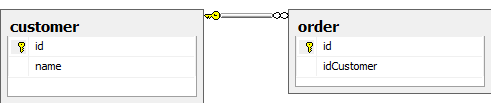
Entity Framework does great job with taking care of entities changes and entities collection internally. And its uses almost plain POCO objects. Almost because collections of dependents data like in 1 to many tables relationship needs virtual keyword. Its understandable since EF needs to track what happens to collection. For instance lets have 2 tables: Customer and dependent Order.
Last time I wrote about problem with testing Entity Framework in Visual Studio 2012. During working on this project I also encounter problems with configuration of Ninject to allow injecting Entity Framework classes from its Patterns extension. To be frankly this was not much a problem then lack of documentation. I just was forced to experiment with Ninject and new-thing-for-me Entity Framework Patterns extension.
Recently I was asked at work for quick review of small project. It was created (or updated) in newest version of Visual Studio - 2012. I don’t have installed VS 2012. I could install it, yes, but it would be just waste of time since browsing through code in that project took me only few hours. So I decided to try to open that in VS 2010.
· 1606 words · ~8 min read
· updated
· in .NET, C#, Matlab
While writing an application for my Masters degree diploma, I wrote a simple application that was using COM Matlab server. I have found it hard to use it mainly due to lack of documentation, which is really basic with only few code examples for C#. I guess writing programs that use Matlab for calculating is not encouraged by MathWorks, you would became competition that way :) Nonetheless, I accomplished why I was required to do, so I decided to share this with the rest of the world.
· 795 words · ~3 min read
· updated
· in .NET, ASP.NET, C#
Yesterday I was writing about creating server controls in separate assembly
. Today I will cover more complicated example then simple “Hello World!” control. My goal was to create text box that will take handler method to run when validation event will be triggered, and when validation fail will show appropriate message. Text box with builtin validation would be nice, since you alwaysshouldvalidateuser input
, right? But lets start creating our control.
· 394 words · ~1 min read
· updated
· in .NET, ASP.NET, C#
In my project I wanted to create text box control with builtin configurable validation. ASP.NET definition in .aspx or .ascx file would get validation function by name. But I do not wanted to create just .ascx file with text box. I could not then reuse that control in other projects and it certainly would be nice, right? Creating such server control from code is not hard, but maintainability of HTML code in C# (it cannot be done other way) is not good. It’s pain really. Why Microsoft would create way to automatically create C# code from .ascx, .aspx files is mystery for me.
Yesterday I wrote about issue with Ajax postbacks
in application I am working currently. Problem was with buttons that was triggering UpdatePanels to update asynchronously. After adding loading indicator I wanted to add error handling at client side.
When I started working on application I am working right now, one of first things I noticed, that was not entirely wrong but was inconvenient: when user clicked on some button that triggers update panel you was not entirely sure it worked or not. Why? Because of three things:
Other day I was experimenting with finding which UpdatePanel will be updated during page post back.
I found out that my solution was not working correctly for complex triggers, like user controls with custom events, which will trigger async postbacks and update of panel. Or for grids with buttons. It was big issue. Also it was not pointing to correct UpdatePanel if name of control was not entirely unique (for example when you have multiple same custom controls on page). It would return first panel, even if it wasn’t updating.
When I was working with WinForms application in previous work I have found one of most useful feature, ability to show some message to the client. For example user cannot edit some entity in particular time (it is being edited by someone else) or should change password because it will expire in x days. I wanted to do something similar in my web application.
Yesterday I was playing with finding all UpdatePanel controls on page during generating response in ASP.NET. Since object with this information is private itself and collection of panels is private in that object, I had to write some code to extract that data. I ended up with to extension methods for Object type, for getting private field an private property. It’s pretty straightforward, besides one thing: since member is private. And we don’t know in witch type exactly (every type in base/descendant hierarchy have it’s one private members) we have to search them all. So this is final code: