I posted already about me selfhosting LLM models. Right now I have two devices:
Framework Desktop
Custom Ryzen Threadripper server with R9700 32GB GPU
Both are decent with llama.cpp. The biggest issue is prefill times.
I have from work subscription for Claude and Codex which I tested too for last couple of months. It is OK but lack of thinking traces really hurt to keep up with what models are doing.
I know that LLM or Large Language Models are designed to mimic what people write, but still from time to time it surprises me and make me chuckle.
I am working on small tool that runs agents in confinement that gives those programs limited set of tools that you would want them to use only. Otherwise they may try to use sudo to change system settings or kill all your docker containers instead of only few were created by them. I had several times the same problem with codex not being able to start in such sandbox because of permissions issues. I am using Qwen 3.8 for now and it thinks a lot and this particular case it was thinking about those permissions.
Qwen 3.8
is out since Friday, 17 of August. I am running it on my own server since Saturday. I am running Q4 quants from unsloth
.
So far it feels like a step up from Qwen 3.6 27B, which sometimes had problems figuring stuff in my project that I am developing almost entirely using models - just as a test of how far I can push LLMs in agentic coding - mostly local models, I must add. Qwen 3.8 seems like having no problem at all.
Just couple of days ago poolside released their new model: Laguna S 2.1. I was happy to try it since it have native support for 1M tokens in context. I am doing development of hobby projects on my phone, via SSH prompting models to do stuff and 250k tokens of context using Qwen 3.6 27B usually means going through few rounds of compaction before I am happy with the results. Having longer context would be better - in theory - without those ugly interruptions and reiterating stuff to agent that were lost in previous session.
After few days fighting with local LLM to force it to write documentation and comments in code, in good quality I must add, and the forcing it to write readable unit tests, after I wrote:
File is untracked (new). Build passes. Ready for review.
I just answered.
awesome mate. It is friday we deserve a brake. High five.
After optimizing lately my vllm startup I started optimizing performance of vLLM during inference. Thing it had abysmal performance spanning like 2-4ts. Or even 0.5ts with 180k context. That was really terrible and I started to think that I wont be able to get better performance out of Strix Halo inside my Desktop Framework.
But… I remembered people praising it and its great usability with agents and Qwen models. How is that possible since it have so terrible performance.
AI hype is calming down in some companies
, but in others like in the one I am currently consulting for, we still on the hype.
Few days ago I was asked by my peer about some problem with the tool that I was mostly developing. This is fine are there are always some bugs in every software, though bug was concerning behavior on bad data and therefore out of scope really. Still I offered to help, regardless of the fact that correct fix would be to fix the bad data.
I have been running few coding agents in my spare time on my personal projects and Junie does not look great when paired with local model
First of all, local models are capable but their ability to answer prompts in sustainable speeds degrades very quickly. I was experimenting with Qwen3.6-35B-A3B and Qwen3.5-35B-A3B. Both seems to be fairly capable, which is great for a local model that can run on decent GPU that is few years old (I have Radeon 7900 XTX with 24GB of VRAM) - that is outstanding considering what we thought about computers i.e. ten years ago. If someone then would say to me that we will be able to converse with our applications in human language and instruct them to do useful stuff, I would say: ‘Impossible!’. But we can and it does work but it have limitation, mainly in context size.
vLLM has very slow time to first token (TTFT). On AMD Ryzen AI Max+ 395 it can take even 10 minutes depending on exact settings and model size.
To make my user experience of using those things myself I need to have comparison of llama.cpp and vLLM startup time and performance. But to do this I needed to perform optimizations of startup of vLLM since it is even slower to start then it was with v0.17.
I was playing over the weekend trying to write POC of C# interactive console. It is not ready yet but I wanted to have some cute hamster as logo for this project - I will probably incorporate it to some degree into Hamster Wheel
, so cute hamster seemed appropriate.
Just for fun I decided to use LLMs to generate it since maybe I will not finish this project ever so trying to do it myself would be waste of time. And result probably would be terrible since I do not have any artistic skills.
I have Desktop Framework for 2 months now. It is pretty capable for interefence with small contexts. With longer contexts it degrades quickly. It can for example can run 100k tokens contexts for 10minutes. Because of those limitations I decided to try vllm again - maybe it will be quicker. Two months is long time in LLM frameworks last time I was using vllm it has version 0.17. Now stable is 0.19.
Vibe was the first coding agent I tried to use with local model. It works and it is fun to have ability to to just tell the computer to do something you want in plain English or even in your own language if your model support it.
Installation and Configuration
There are several installation methods for vibe that are available along to the usual, security nightmare of running of piping curl-downloaded scripts directly to bash :) I advise using other installation methods for example via uv:
Jet Brains have their own coding agent. Since I am already using Rider and all coding agents are pretty slow and inefficient with what they do I wanted to test if Junie have better integrations with IDE which would make things much faster.
For example if you will have following unused namespace in Rider.
Removing it all cleaning all unused namespaces in entire project or even entire solution is just few clicks away. Or key strokes.
I like to self-host my own services. I have my own email server. I have my own cloud storage and sync and backup. I want to have this secure and safe while having my data private.
But I need to learn and be up to date with current technology.
I decided to use Junie
with my own, self hosted models
that I run on my own hardware
. In the docs they say it can be run on top your own custom provider and model. But it does not work with Rider plugin. You are limited to their own limited list of models.
Today I noticed that new version of Qwen was realesed
. Only 35B-A3B for now but this is the same size of Qwen I was using previously. Usually (as with every other software) it is better to wait few weeks for fixes, in this case for re uploads of the model, that is done after testing/template adjustments, but it is not a problem to do few tests. I decided to give it a spin. I added it to my llama swap instance and started it up.
Today I finally was able to download and run largest Qwen 3.5 model. I downloaded the smallest quant even if a bit bigger probably would fit too, but I want to run also few smaller models at the same time, so 107GB for UD-IQ1_M is the biggest I was able to spare.
I downloaded and was able to run it with llama.cpp with the following command:
Few days ago I was working on my own fork of nanobot. I was not happy how few things are not entirely correctly implemented in this project. For example command support in Matrix channel. I created PR for that one here
. Unfortunately it was not merged yet. I am not sure why. Maybe it is mising few unit tests.
Yesterday I posted about vLLM being nice but optimized for different usage I am being really interested in
. I commented on Llama Swap GH issue asking for help my problem of vLLM being shutdown before it actually started. During writing that comment I was thinking about Llama.cpp and it inability to run Qwen 3.5. It was at the beginning of March when I started (again) experimenting with LLMs. I tried to run Qwen models with release version of Llama.cpp and it was failing with ‘model architecture of Qwen3 is not found’ (or something like that; I do not really remember). Because of that I switched to using vLLM, even if it could not run Qwen 3.5, it could run Qwen 3 just fine from the docker image. Sglang seemed like not a good choice for my needs.
I was using vLLM to run my AI assistant models for few weeks now. It is quite nice, production ready framework that have few bugs
. ROCm support and by extent Strix Halo support is quite nice, even if AMD GPU docker image does not work on Strix Halo without aiter
in custom version.
Interference speeds are quite nice. You can get 20-30t/s out of new AMD APU. Which is totally usable. Here is sample test I done on this device via LLM API Throughput Benchmark:
Today I was fixing an issue with my assistant having a hard time accessing web search
. I fixed that but I was not entirelly satisfied with the result. Browsh is great for that used but I am using StartPage on my PC and on my phone. Ability to see similar or even the same web search result for me and my assistant would be great.
How hard it can be to actually fetch the result od search via CLI? Actually it is not that hard. I was able to figurę it out though it requires very specific set od parameters, headers being sent to very specific address.
Few days ago I thought my assistant to do web search via Browsh
and Duck Duck Go. It was working for some time with small problems, like for example I changed host name of the machine hosting nanobot and forget to adjust the host name in skill URL. Another small pain point is that sometimes returns timeout instead of web page content and not falls back to Brave Search API, and since I do not like that service, there is no API key and it falls back to DDG via python code. So it is mostly slow but I am still happy with that.
Recently
I started playing with Nanobot
which is a bit like OpenClaw but, in my opinion much better since it is small and simple and have native integration with custom OpenAI APIs providers. I decided to use vLLM
because I wanted to use Qwen 3.5
because according to my quick reaserach it is pretty good in such agentic usage and Qwen models are built with integration with SgLang and vLLM frameworks in mind. Also AMD is testing their own drivers and libraries, ROCm on docker images with SgLang and vLLM and Desktop Framework is AMD APU. So all of it since like a good idea since I decided to go with Strix Halo unifies memory architecture
for my AI assistant. I bought
Desktop Framework motherboard and played with it a little
to test models performance on ROCm inside the docker. It was not blazing fast but enough to actually have working solution.
It is amazing how time flies… I am living at my current house already 9 years almost. I did put up a fence around the house in 2019. Next year I installed metal gate with automation and was working on a way to make it more ‘smart’. My first attempt was to have small raspberry Pi connected via some metal wires and solid relays to the gate electrical engine. It is working like that till now.
I did make mistake installing my favorite Debian Linux distribution on Desktop Framework
PC I am using to run my LLM models. Probably some hacking during installing vLLM and all libraries and drivers and I would be able to make it work. But is it really worth it? I think it was not. So I switched to Ubuntu and I am running Qwen 3.5
second day now.
For now I can say that I am very happy. It seems to be able to reason much better than its predecessor Qwen 3. It have pretty good vision capabilities. It is able to fix its own mistakes, which makes its usage much easier.
I am using pyLoad download manager for quite some time now. Previously when I was running windows server I was using JDownloader. I think it was better in few things, for example it was able to automatically name a package based on the name of the file from the link. So if I would be trying to download https://cdimage.debian.org/debian-cd/current/amd64/iso-cd/debian-13.4.0-amd64-netinst.iso, it would automatically name a package ‘debian-13.4.0-amd64-netinst.iso’. Folder with downloaded file would be named the same too. Much more convenient. If I would drop multiple links for the same file it would be downloading them in parallel, downloading them much quicker. Though with current speeds in average home maybe this is not necessary anymore. It had better UI, in my opinion, but maybe I was more accustomed to windows desktop then; certainly it was better to have single view instead of 3 views like in pyLoad:
I bough lately Desktop Framework with intention of running Qwen 3.5 as model for my AI assistant on Nanobot
. At first I could not run this model on this hardware for some weird bug in one of the libraries. I explained why and how I fixed it here
. In this post I will just put the list of packages that I used to run Qwen finally and vLLM command switches and parameters.
I did make a mistake trying to run a vLLM server on Debian. I theory everything should be OK: Debian is stable, have docker, docker have images for vLLM so I should be able to run all the models on docker on Debian. Also it should not really matter what distro is as long as it have new kernel and docker works. That in theory. I practice I could not force some models to run and Qwen 3 even if it was capable enough it felt limiting at times. For example I was unable to force it to work in agentic loops. I am not sure what was the problem, probably some configuration issue that I am still unable to understand and fix. Still that was just a simple problem that required me to give my assistant some nudge with another prompt. It was not as bad another issue though.
Today my new NVMe disk arrived. I bought it for my new Desktop Framework mini PC
on new AMD APU intended for AI workloads. Certainly it will be better suited
for running my AI assistant then my daily working PC. Though performance will be a bit worse. But still better than CPU.
Anyway I decided to split my assistant into 2 parts. The nanobot part will be working on my main server and model (or models) that will be working on Desktop Framework. This way more powerful machine will be running AI assitant UI and operations and LLM capable device will do faster interference - that will be the Framework device. Nanobot communicate with model via OpenAI API anyway so it is not a problem. Maybe a bit of security in terms of HTTPS with some auth would not hurt. Or maybe I will put it in private subnetwork that can’t be accessed from outside and only have internet when necessary? Running dockers and all of those python AI firework is not exactly secure but maybe I will deal with that later.
I ordered Desktop Framework
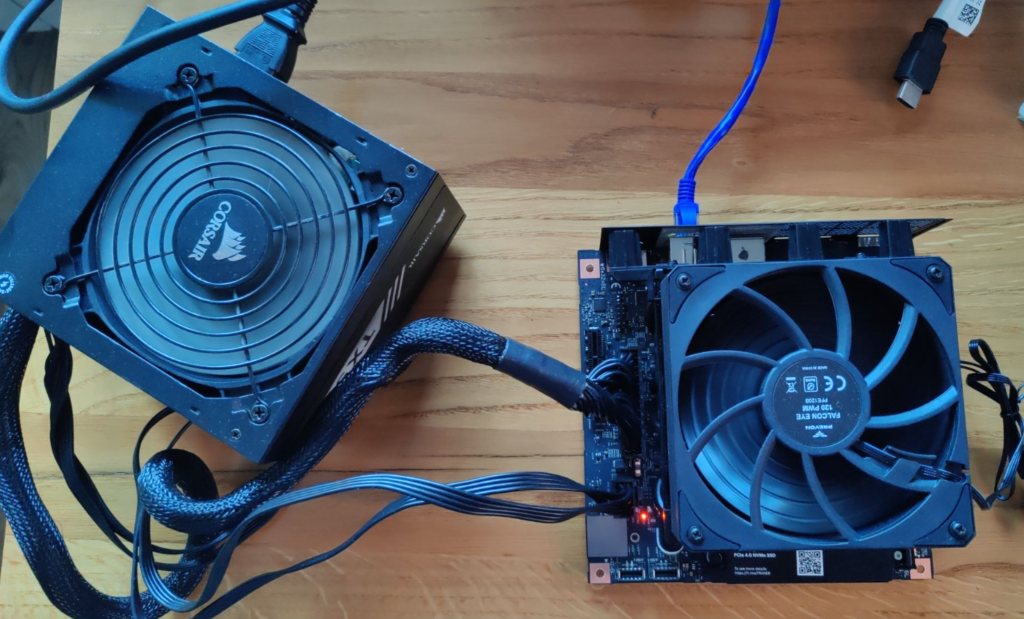
motherboard last week and today it arrived. It was neatly packaged and did not come with anything else then some piece of plastic to mount your own fan on top of the radiator. But I did not need much else. At least for first tests.
I had some PSU laying around that was compatible. I have some old fan that I was able connect to board even if it was a bit to small but would cool it a bit at least.
Recently
I started playing with nanobot
. It is pretty cool tool. I was able to connect it to my own instance of vLLM running Qwen 3. I must say that so far it is great experience. Though it was sometimes annoying.
What was itching me from the start was abuse of emojis by the bot. I am using emojis from time to time myself, but what was produced by LLM was just excessive. Almost every message was finished by:
Main problem with running your own AI assistant is speed. Nanobot is lightweight but main problem it time od the reponses generated by the model. I am running right now Qwen 3 27B parameters. Average reponse varies but it is at least few seconds. If I would have faster GPU than Radeon 7900 XTX than probably it would faster but prices of GPUs are crazy now.
One of the things I have been testing my little chatbot with was searching for stuff on the internet. For example I like to check prices of some PC parts from time to time. Just out of curiosity and to have a knowledge how crazy it is (NVMe SSDs of 8TB sizes are at least 2x times pricier than last year, on the other hand salary for my profession dropped to 60-70% last 3 years, without inflation, with inflation it would be around 58%). Things are crazy.
Recently I started playing with AI assistant using nanobot.
It is good but so far I am running it on my daily working PC. And it is not great experience so far
. So I am exploring some other way that will allow me to do that, especially when I am not at home but still want to use my little helper to do stuff. Running big PC in your office next to your bedroom is not the best idea. And electricity bill would also not be that great.
Of course you can have more powerful device so you will not notice few models running in the background but this is like running a fan with heater under your desk.
Lately I started playing with an LLM operating as my own virtual assistant
. I was skeptical, I mean I still am skeptical, about this whole ‘AI will take your job’, but now I do understand the appeal. You can finally have a computer do your biding in a way you control. Previously computer were complicated beasts. You needed to appeal to it like with threats in form of complicated keystrokes forming more complicated commands evolving in even more complicated programs that may or not do the thing you actually wanted. Or it may be not amused by your plea and swallow your data. You would never know for sure if you would not learn those complex magical incantations in magical schools called Universities which takes years and a lot of money. Or you could hire those magicians, Software Engineers, or even Archmages, that commands magicians, called Software Architects that would be appeasing the capricious spirit of the machine to direct flow of money in a company in a correct way. But this is costly and those spells takes years. So you may hire more magicians, entire houses of magic that will appease, train and teach your pricey machine beasts to do what you need them to do. Those houses are called Software Houses for Enterprise Solutions. And they will force those machines to do what you need them to do. Sometimes they will replace entire herds of machines because previous ones were not cooperative enough. And this is costing you riches beyond riches. If you did not had your weight in gold to buy such service you could buy trained machine to do what you need that were not even at your house but somewhere far beyond the realms of your kingdom, in a place called The Cloud. Or you could buy complex incantation that needed only few keywords in correct place to operate your business - CRM or Accounting System or ERP.
Two days ago
I started playing a bit with my own AI assistant. It has been very great and funny experience so far but with few wrinkles. For example:
performance of new models on previous generation GPU (Radeon RX 7900 XTX) is surprisingly good with average of 28t/s but it takes whole VRAM and put a load on PC overall.
It takes whole lot of disk space. I.e. one vllm docker image to download and extract needs about 18gb; this seems a bit excessive.
Rocm installation needed a bit like 9gb to install all of its binaries. How much code do you need to produce 9gb of compiled code? This is crazy.
I have 16c/32t CPU and it seems to be enough for most of my workload but with llm in the background sometimes most of it is in use.
32gb is not enough, but with current prices I can suffer for now. :)
If you want to swap models a lot you need a lot of disk space since bigger models takes several gigabytes.
You need decent internet speed to be able to download it.
Yes you may say that it is fine in 2026, everybody have fiber connection now! Yes but when you want to test something and new docker image is downloading in with 1mb/s speed, you may have a walk in that time.
I started digging into Nanobot code
to check why it cannot connect to Matrix server despite the config being correct and nanobot gateway being executed. Just in case I messed up something I did recreate entire nanobot workspace by doing nanobot onboard after removing entire directory. Did not work.
Closer inspection of the code shed some light on the problem: the config was not being used because channel was never instantiated. That part of the code was gone for some reason despite the Readme stating it is possible to integrate nanobot with Matrix.
I have my own matrix server for my own use. Usually it is used by me a bit by my family and most of it by my own services to sent me some notifications.
Lately I started playing with nanobot.
It is personal AI assistant like OpenClaw. I wanted to be able to chat with it in my own Matrix via my own phone. To do that I needed to create new user dedicated
I recently started experimenting with my own AI asisstant. I decided to skip on OpenClaw for being massive slop of 400k LOC of vibe coded monstrosity. Looking trough web I found that there is also NanoClaw which seems much better but looks like it is tied to Anthropic service and I like owning my own data and I self host what I can.
That left me with Nanobot being my only option from bigger open source projects that are (relatively) known, are under active development and have big user base.