It is amazing how time flies… I am living at my current house already 9 years almost. I did put up a fence around the house in 2019. Next year I installed metal gate with automation and was working on a way to make it more ‘smart’. My first attempt was to have small raspberry Pi connected via some metal wires and solid relays to the gate electrical engine. It is working like that till now.
I did make mistake installing my favorite Debian Linux distribution on Desktop Framework
PC I am using to run my LLM models. Probably some hacking during installing vLLM and all libraries and drivers and I would be able to make it work. But is it really worth it? I think it was not. So I switched to Ubuntu and I am running Qwen 3.5
second day now.
For now I can say that I am very happy. It seems to be able to reason much better than its predecessor Qwen 3. It have pretty good vision capabilities. It is able to fix its own mistakes, which makes its usage much easier.
I am using pyLoad download manager for quite some time now. Previously when I was running windows server I was using JDownloader. I think it was better in few things, for example it was able to automatically name a package based on the name of the file from the link. So if I would be trying to download https://cdimage.debian.org/debian-cd/current/amd64/iso-cd/debian-13.4.0-amd64-netinst.iso, it would automatically name a package ‘debian-13.4.0-amd64-netinst.iso’. Folder with downloaded file would be named the same too. Much more convenient. If I would drop multiple links for the same file it would be downloading them in parallel, downloading them much quicker. Though with current speeds in average home maybe this is not necessary anymore. It had better UI, in my opinion, but maybe I was more accustomed to windows desktop then; certainly it was better to have single view instead of 3 views like in pyLoad:
I bough lately Desktop Framework with intention of running Qwen 3.5 as model for my AI assistant on Nanobot
. At first I could not run this model on this hardware for some weird bug in one of the libraries. I explained why and how I fixed it here
. In this post I will just put the list of packages that I used to run Qwen finally and vLLM command switches and parameters.
I did make a mistake trying to run a vLLM server on Debian. I theory everything should be OK: Debian is stable, have docker, docker have images for vLLM so I should be able to run all the models on docker on Debian. Also it should not really matter what distro is as long as it have new kernel and docker works. That in theory. I practice I could not force some models to run and Qwen 3 even if it was capable enough it felt limiting at times. For example I was unable to force it to work in agentic loops. I am not sure what was the problem, probably some configuration issue that I am still unable to understand and fix. Still that was just a simple problem that required me to give my assistant some nudge with another prompt. It was not as bad another issue though.
Few days ago
I started playing with AI assistant and I decided to buy new hardware dedicated to running LLM. I bought Framework Desktop board. So far it is really great but running more than one model is a bit difficult and I wanted to test few things while my nanobot is running undisrupted.
I did quick search on my phone before buying and people were saying that it is possible to set it up via BIOS settings up to 96GB.
Today my new NVMe disk arrived. I bought it for my new Desktop Framework mini PC
on new AMD APU intended for AI workloads. Certainly it will be better suited
for running my AI assistant then my daily working PC. Though performance will be a bit worse. But still better than CPU.
Anyway I decided to split my assistant into 2 parts. The nanobot part will be working on my main server and model (or models) that will be working on Desktop Framework. This way more powerful machine will be running AI assitant UI and operations and LLM capable device will do faster interference - that will be the Framework device. Nanobot communicate with model via OpenAI API anyway so it is not a problem. Maybe a bit of security in terms of HTTPS with some auth would not hurt. Or maybe I will put it in private subnetwork that can’t be accessed from outside and only have internet when necessary? Running dockers and all of those python AI firework is not exactly secure but maybe I will deal with that later.
I ordered Desktop Framework
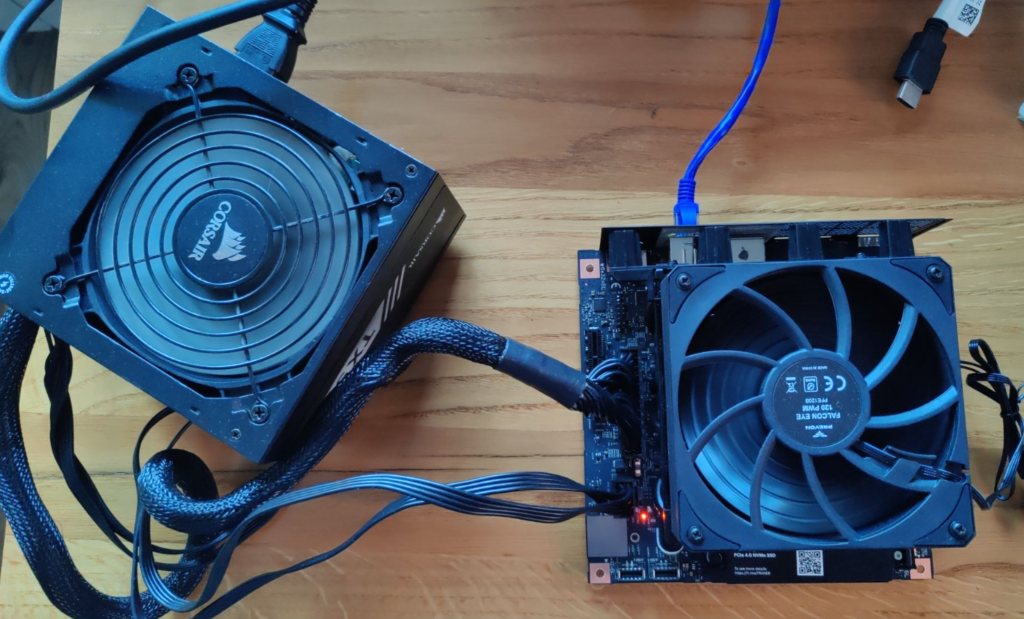
motherboard last week and today it arrived. It was neatly packaged and did not come with anything else then some piece of plastic to mount your own fan on top of the radiator. But I did not need much else. At least for first tests.
I had some PSU laying around that was compatible. I have some old fan that I was able connect to board even if it was a bit to small but would cool it a bit at least.
Recently
I started playing with nanobot
. It is pretty cool tool. I was able to connect it to my own instance of vLLM running Qwen 3. I must say that so far it is great experience. Though it was sometimes annoying.
What was itching me from the start was abuse of emojis by the bot. I am using emojis from time to time myself, but what was produced by LLM was just excessive. Almost every message was finished by:
Main problem with running your own AI assistant is speed. Nanobot is lightweight but main problem it time od the reponses generated by the model. I am running right now Qwen 3 27B parameters. Average reponse varies but it is at least few seconds. If I would have faster GPU than Radeon 7900 XTX than probably it would faster but prices of GPUs are crazy now.
One of the things I have been testing my little chatbot with was searching for stuff on the internet. For example I like to check prices of some PC parts from time to time. Just out of curiosity and to have a knowledge how crazy it is (NVMe SSDs of 8TB sizes are at least 2x times pricier than last year, on the other hand salary for my profession dropped to 60-70% last 3 years, without inflation, with inflation it would be around 58%). Things are crazy.
Recently I started playing with AI assistant using nanobot.
It is good but so far I am running it on my daily working PC. And it is not great experience so far
. So I am exploring some other way that will allow me to do that, especially when I am not at home but still want to use my little helper to do stuff. Running big PC in your office next to your bedroom is not the best idea. And electricity bill would also not be that great.
Of course you can have more powerful device so you will not notice few models running in the background but this is like running a fan with heater under your desk.
Lately I started playing with an LLM operating as my own virtual assistant
. I was skeptical, I mean I still am skeptical, about this whole ‘AI will take your job’, but now I do understand the appeal. You can finally have a computer do your biding in a way you control. Previously computer were complicated beasts. You needed to appeal to it like with threats in form of complicated keystrokes forming more complicated commands evolving in even more complicated programs that may or not do the thing you actually wanted. Or it may be not amused by your plea and swallow your data. You would never know for sure if you would not learn those complex magical incantations in magical schools called Universities which takes years and a lot of money. Or you could hire those magicians, Software Engineers, or even Archmages, that commands magicians, called Software Architects that would be appeasing the capricious spirit of the machine to direct flow of money in a company in a correct way. But this is costly and those spells takes years. So you may hire more magicians, entire houses of magic that will appease, train and teach your pricey machine beasts to do what you need them to do. Those houses are called Software Houses for Enterprise Solutions. And they will force those machines to do what you need them to do. Sometimes they will replace entire herds of machines because previous ones were not cooperative enough. And this is costing you riches beyond riches. If you did not had your weight in gold to buy such service you could buy trained machine to do what you need that were not even at your house but somewhere far beyond the realms of your kingdom, in a place called The Cloud. Or you could buy complex incantation that needed only few keywords in correct place to operate your business - CRM or Accounting System or ERP.
Two days ago
I started playing a bit with my own AI assistant. It has been very great and funny experience so far but with few wrinkles. For example:
performance of new models on previous generation GPU (Radeon RX 7900 XTX) is surprisingly good with average of 28t/s but it takes whole VRAM and put a load on PC overall.
It takes whole lot of disk space. I.e. one vllm docker image to download and extract needs about 18gb; this seems a bit excessive.
Rocm installation needed a bit like 9gb to install all of its binaries. How much code do you need to produce 9gb of compiled code? This is crazy.
I have 16c/32t CPU and it seems to be enough for most of my workload but with llm in the background sometimes most of it is in use.
32gb is not enough, but with current prices I can suffer for now. :)
If you want to swap models a lot you need a lot of disk space since bigger models takes several gigabytes.
You need decent internet speed to be able to download it.
Yes you may say that it is fine in 2026, everybody have fiber connection now! Yes but when you want to test something and new docker image is downloading in with 1mb/s speed, you may have a walk in that time.