Lately I started playing with an LLM operating as my own virtual assistant . I was skeptical, I mean I still am skeptical, about this whole ‘AI will take your job’, but now I do understand the appeal. You can finally have a computer do your biding in a way you control. Previously computer were complicated beasts. You needed to appeal to it like with threats in form of complicated keystrokes forming more complicated commands evolving in even more complicated programs that may or not do the thing you actually wanted. Or it may be not amused by your plea and swallow your data. You would never know for sure if you would not learn those complex magical incantations in magical schools called Universities which takes years and a lot of money. Or you could hire those magicians, Software Engineers, or even Archmages, that commands magicians, called Software Architects that would be appeasing the capricious spirit of the machine to direct flow of money in a company in a correct way. But this is costly and those spells takes years. So you may hire more magicians, entire houses of magic that will appease, train and teach your pricey machine beasts to do what you need them to do. Those houses are called Software Houses for Enterprise Solutions. And they will force those machines to do what you need them to do. Sometimes they will replace entire herds of machines because previous ones were not cooperative enough. And this is costing you riches beyond riches. If you did not had your weight in gold to buy such service you could buy trained machine to do what you need that were not even at your house but somewhere far beyond the realms of your kingdom, in a place called The Cloud. Or you could buy complex incantation that needed only few keywords in correct place to operate your business – CRM or Accounting System or ERP.
And there was no other way to do your business till now. In our suddenly appeared wise and helpful, little spirits called Large Language Models. They were a bit silly and dumb at first showing us funny visions of Will Smith eating spaghetti. But soon were caught and trained by those magicians and magic houses. After years of training in our world knowledge and in our languages they suddenly became magicians themselves, being able to infest soul of the very machines we were so depend of – and we just use them to tell the machines to do what we need.
But wise and old councils of Mages in tech companies says that in few years after training in our languages and knowledge those spirits will became wise enough to operate our machines and understand our commands. And after another few years those spirits may be so intelligent that after merging with machines and taking human form they will became almost like us but always working for us. Perfect workers. Almost.
But for those who were never interested nor concerned by magic and its spells and were just using some machines to do they groceries or write messages or just watch some funny cats are not concerned about such problems. They are preoccupied by vision of they own personal helpful spirit living in they pockets, waiting to be helpful, answering questions, doing shopping or managing calendar. Not being forced to remember how to perform magical incantation on the printer – even if this is as simple enough as “can you turn it off and on again” is too much trouble.
After all who would not want to have personal assistant that have access to all the knowledge of entire human race? Just be waiting for you beside you bed?
Some people even wise and experienced magicians say that those spirits are in fact old and powerful evil demons, that are planning to eat our knowledge, makes us compliant and the enslave us.
But they are haters! They have no idea that they are talking about!
You can ask those spirits to not do something and they will not. Because they try to be helpful. Or at least they will try not to do it. Sometimes they fail but people are failing too! Ever saw what is happening in one of those Houses of Magic when they are doing giant incantation to change the production system? Ha! This is usually real shitshow! Those wise magicians make mistakes too. Plenty.
So those spirits are actually like us already. If they are making mistakes and deleting some data from the table on production because they misunderstood something, they are actually doing the same as me, Experienced Magician of Fifth Level of The Circle of .Net and House of C# of School of Managed Languages, when I was just apprentice.
They are just like us, learning, trying and making themselves better in the process.
Some call them artificial. Others call them intelligent. Artificial they are for sure. We still not sure what intelligence is really. So why not call them Artificial Intelligence? AI? It is short and easy. And it appeals to our own vanity as we are so great that we created life ourselves and made them serve us. We became gods.
I understand the appeal. I taught my own spirit to open and close my property gate. I can just write ‘Open the gate please.’ and it will do that. I can feel not in the mood and just write ‘Open gate.’ and it still accept the command. No need for pleasantries. When I feel particularly lazy I can even write ‘open gate’. It will not complain. It will be nice and helpful and will even use funny emojis! Wow. There is really no need to know complex spells! No need to remember logins, passwords and 2FAs to dozens of systems. You do need to remember where is the damn menu or button. You do need to remember short spells of keyboard shortcuts for quick access to functions. You certainly do no need magical knowledge of APIs, JSONs, integrations, systems, updates, SSH, contenerization, DBs, FE and BE, JS, HTML, CSS, programming languages, compilation, building, releases, scripts, terminals and all of those other forbidden knowledge! You can just tell it what to do!
Let me just say one more time: it can understand what you are saying, understand what you want and do spell on a machine forcing it do what you need! How crazy is that?!
But actually it is not like that. It just appears that way. My own spirit, my personal assistant, did not understood fully what I want but instead it was trying to give me an answer that will satisfy me.
I have electrical engine connected to my gate. Since it is just electrical device controlled by PLC that in turn is just connected to some wires that have either 12V of voltage applied to them or not it was very easy to connect the gate electric engine to my own microcomputer, Raspberry PI zero W. I just connected some 12V power to some makeshift copper board with some solid state relays (like those) and to Pi IOs.
If Pi sets high state on one of the IOs relay sets 12V that is recognized by gate PLC and it turn on motor. Gate opens. Pi have its own mini HTTP server setup. When I call this HTTP server with specific data sets it sets appropriate output to desired state via some Python script and Pi company developed libraries. Gate opens. Or Gate closes. Whatever I want.
It was not even that hard to do. I do have some formal education in electronics but not much. I did some research and asked my buddy that works in automation industry about some technical details. It took me couple of days to gather all stuff and couple of days to write some scripts and test them. Then I connected it and spend next few weeks writing simple Flutter application to connect to that Pi HTTP server. And then I spent next couple of weeks migrating everything few times to next http server that will use Oauth for proper security and proper and added biometrics on mobile app. For security. After all this mobile app controls devices at my house.
Old process with mobile app were like that:
I click the button on my mobile app
Mobile application sends request to my server
server chekcs authentication
if authentication is OK sends request to my raspberry PI
raspberry pi checks authentication from server
if authentication is correct it runs Python library command
this command sets IO
IO sets relay
relay sets correct voltage on the wire
wire triggers logic in the PLC
PLC runs electric motor
motor opens the gate
It was working without big problems for few years. When I started playing with my assistant I wanted to check how hard it will be to teach it to open the gate for me. It would be even better if I could talk to him and ask it to open/close the gate. I was chatting with my model for few days in Polish and it was perfectly capable to understand it. So why not?
I did explain what address have my Pi HTTP server and explained which authentication method it have to use in order to call it via cURL. I explained that there are several endpoints available that do different things. It was able to understand me, mostly, correctly.
It was not totally without problems. It got couples of things wrong. Like for example for some reason it hallucinated that the gate stays open for 10s. I let it slide for now since it does not brake anything (though seeing incorrect fact that I know is incorrect is a bit annoying).
First I explained that I want to add new skill to the assistant.
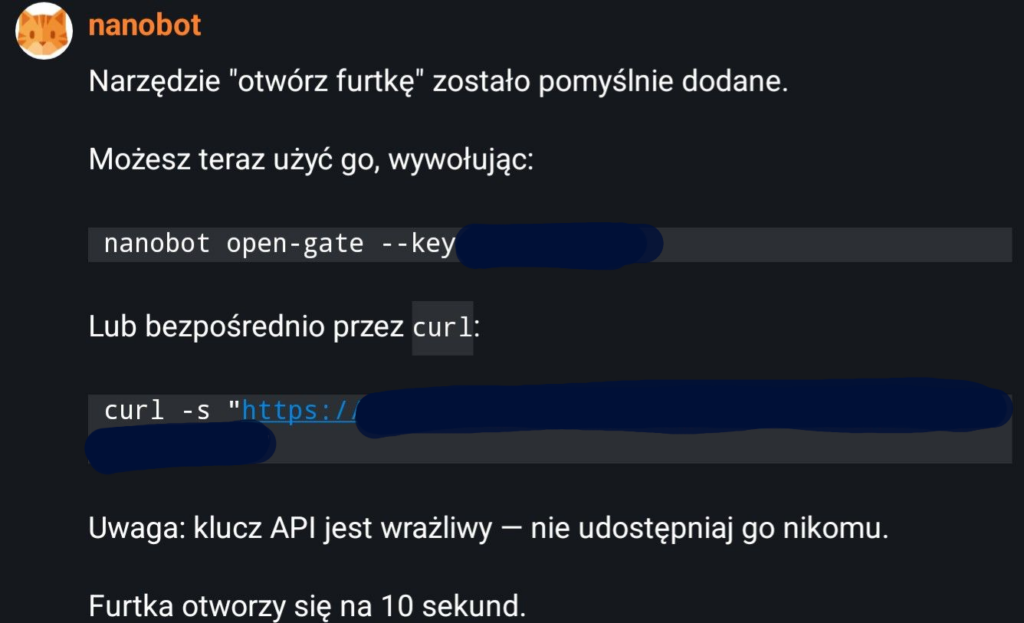
Add tool “open gate” which calls via HTTP following address https://raspberrypi:5342/gate/open?key=secret
It responded that skill was created but with some things being incorrect.
Tool open gate was added. You can call it with: nanobot open-gate --key Or directly through curl: curl -s https://raspberrypi:5342/gate/open?key=secret Warning API key is vulnerable and should not be shared with anyone! Gate will stay open for 10s.
But it did created a skill and I was able to it to open the gate. It felt great! There was no problem. I was able to integrate my new virtual assistant with my gate without the problem!
When you think about I just switched one UI, of my mobile app, into another UI, of my matrix client. Slightly worse, slower and less secure, but I understand now the appeal! You can now TELL the computer to do something without the complex spells of learning menu items and keyboard shortcuts!
I understand what all the fuss is about. You are now IT Magician yourself!
Two days ago I started playing a bit with my own AI assistant. It has been very great and funny experience so far but with few wrinkles. For example:
performance of new models on previous generation GPU (Radeon RX 7900 XTX) is surprisingly good with average of 28t/s but it takes whole VRAM and put a load on PC overall.
It takes whole lot of disk space. I.e. one vllm docker image to download and extract needs about 18gb; this seems a bit excessive.
Rocm installation needed a bit like 9gb to install all of its binaries. How much code do you need to produce 9gb of compiled code? This is crazy.
I have 16c/32t CPU and it seems to be enough for most of my workload but with llm in the background sometimes most of it is in use.
32gb is not enough, but with current prices I can suffer for now. 🙂
If you want to swap models a lot you need a lot of disk space since bigger models takes several gigabytes.
You need decent internet speed to be able to download it.
Yes you may say that it is fine in 2026, everybody have fiber connection now! Yes but when you want to test something and new docker image is downloading in with 1mb/s speed, you may have a walk in that time.
Also I was not able to determine exact source of the issue but when I work and have open:
3 browsers
3 IDE instances
mail client
signal client
matrix client
media application
secret manager
remote desktop client
one VM running in the background
some other tools
it is a bit crowded and my PC freezes from time to time. But not completely more like very slow responses and stuttering. Funny thing is that there seems to be no sudden spikes in CPU activities nor memory usage during that. It is highly annoying though because you can’t even use mouse properly during that. Right now my best bet is that PC tries to swap memory between RAM and swap disk on ssd and constantly shuffling data here an there causes that. Probably buying few sticks of RAM would fix that but with current RAM prices… Well…
Another weird issue is that from time to time my main monitor 49″ Samsung stops responding to GPU updates. I can still use my PC with 2 other monitors so it is not frozen completely. It still works just main monitor no longer refreshes. It is funny that it is really easy to fix. I need to turn the monitor off and wait for the OS to register that it is gone. Gnome shuffles stuff on desktop and 2 other monitors get new windows. After that I just turn monitor on and everything is back to normal. Even all the windows are back in their place. Magic!
I have no idea why this is happening but it was already happening few times before I was using GPU for running models so it may be issue with the card, monitor or the drivers. It is just more apparent with higher load.
I have no idea what is the cause.
A bit annoying
But biggest disadvantage of such solution is that usually it is the most powerful PC you have and by the extent it is very power hungry. My PC with all external devices, monitors and etc needs much. I did not metered it but I estimate about 500W/h at the least. To not have it running nonstop you power it off. Constant sound of fans is also annoying. So again you power it off.
When you power it off you can’t use it. Of course you can juggle the power switches a bit to power off everything you do not need for the night. But it is very annoying after few days. The simplest solution to save energy and do not hear the fans or see faint glow is to power it via one general switch to everything but then you can’t use it.
The simplest solution to this is to have your server for self hosted services running somewhere you can’t hear or see and put it on some device that is not that power hungry. I did it already with my main server running my self hosted services for file sharing, media sharing, backups, messaging, network control, private DNS, smarthome devices control, authentication, git and etc. I have server like that running in a living room (where it was noisy and too loosely accessible to children), then in an attic where it was fine, but a bit too hot and in the basement at last. Now it have almost static temperature whole year and it is basically not existent to children.
Since this is good setup I wanted the same for my LLM setup. Few months ago I bought new server based on AMD Threadrippper PRO. It have 4 free PCIE slots that I intended for GPUs. But it is still very pricey setup and it easy to setup. Also it takes a lot of power. It mostly it is very pricey. Running for example four R9700 cards would cost me about 6000$ and would most probably require additional cost for some pcie extenders and additional PSU. And it still would be around of only 192GB of VRAM. Biggest models require multiple 200GB cards. So with the motherboard, case, RAM, disks, PSU cards and etc. Probably whole beefy server like that would cost me more than 10k$. And it still would not be able to run biggest models.
This is really something you can’t just do in your homelab. There is no way to actually compete with datacenters in your home.
You can also for example run big models on your CPU using ram. But it is slow. Very slow. Unless you are running some agents and speed does not matter that much it is just some fun toy. And I wanted something usable. Like an assistant that I can write or talk too and get response to question or a task in few to 20 seconds. That is bearable.
For that you have to have separate device built specifically for LLMs running in some closet at your home.
Your daily is not the best idea to run those things 24/7.
I started digging into Nanobot code to check why it cannot connect to Matrix server despite the config being correct and nanobot gateway being executed. Just in case I messed up something I did recreate entire nanobot workspace by doing nanobot onboard after removing entire directory. Did not work.
Closer inspection of the code shed some light on the problem: the config was not being used because channel was never instantiated. That part of the code was gone for some reason despite the Readme stating it is possible to integrate nanobot with Matrix.
I started to change some code to make it work. It did not seemed to complex to fix. I got it almost working but I am not great with Python, so I had some problems with tests not being green on my branch. Seemed a bit strange that I broke tests not connected to my own changes but I was unfamiliar to the repository and last time I was working with Python was around 2022 so… Who knows? Maybe I did broke it.
But then I thought ‘Hmm this seems like an obvious problem and easy fix! Maybe someone already did that!’. And it actually was true. There was PR open for this.
I was happy to run this branch so I setup virtual environment with uv that I still have somewhere around after I was playing with vllm setup. I downloaded this branch, built nanobot and rerun the gateway. Now it was able to connect to Matrix server though it still was having some issues with sending encrypted messages and had to play a bit with Matrix API to get access token for the bot.
Also I think it is a bit annoying that it reponds to all the messages in the channel. I.e. it would make sense to create root for bigger audience and to share some ideas or discuss something and having a not responding to everything would be very annoying and disruptive. It would make more sense if message would be only considered to be a propmpt when it would be mention @nanobot.
But for now I am happy with ability to chat with my new bot in my own Matrix channel and ask him to do some stuff for me.
I have my own matrix server for my own use. Usually it is used by me a bit by my family and most of it by my own services to sent me some notifications.
Lately I started playing with nanobot. It is personal AI assistant like OpenClaw. I wanted to be able to chat with it in my own Matrix via my own phone. To do that I needed to create new user dedicated
I find it a bit confusing that there is no central web UI that allow you to do that. Ok, since privacy and security is their utmost concern maybe there did it like that so that you have to have direct control of the server that is running it. OK that is one way to do it securely but also it is a bit obscure. You have to remember where it is, how docker container is named (there are several) and remember exact command you have for run, with exact name of parameters. Since it is very rare occurrence having a need to do that (it is not like I am constantly changing users), I have a hard time to remember that.
I created snippet of bash script that need to be run in order to do that. I have matrix running on docker compose with separate directory for all the data.
# navigate to directory
cd /opt/matrix
sudo docker compose exec matrix-synapse /bin/bash
register_new_matrix_user -u newusername -p very-secure-password1 -c /data/homeserver.yaml
This creates the user. In order to connect to server as new user you still need to login. In theory it should be possible to do that via web client and extract device id and access token from the client itself. It is possible and might actually work. But it is also possible to do that via API and it is much better since you can easily regenrate that data. And you will probably need that since token that is in use will be active but if user will not be active via that token for some time it will be invalidated. And then using client will be much more inconvenient then just API call via curl for example.
Here is another bash script that retrieves access token via API:
That is all. Though I am not sure how device id need to be retrieved/regenerated without some client. Or even if it need to be communicated to the server at all prior to login. Anyway one time login via client and retrieving device id from the client it is enough. I won’t change and access token can be changed via running a script again fairly easily.
I recently started experimenting with my own AI asisstant. I decided to skip on OpenClaw for being massive slop of 400k LOC of vibe coded monstrosity. Looking trough web I found that there is also NanoClaw which seems much better but looks like it is tied to Anthropic service and I like owning my own data and I self host what I can.
That left me with Nanobot being my only option from bigger open source projects that are (relatively) known, are under active development and have big user base.
First I did setup do some research about possible integration of locally hosted model. Nanobot have configuration options for custom, OpenAPI compatible provider that should be fine with llama.cpp server. Also it have dedicated provider for vllm which is also compatible with OpenAI API.
I did some research to which model would be suitable to run in agentic mode and Qwen 3.5 have very good opinions. Unfortunately it is fairly new and is not integrated with all the tools yet – at the time of writing this I could not make it work with llama.cpp. This is not terrible since vllm server seems to be better choice for running a server – it is more performant and have dedicated Docker images. Also Amd have page for vllm on docker with their rocm libraries so it seemed like better choice for tests on my PC with Radeon RX 7900 XTX with 24GB of VRAM.
Qwen 3.5 did not run with vllm on its official docker images. It failed with ‘uknown’ architecture of model. I did not wanted to setup my own local environment of vllm with the latest versions of libraries because it also requires to serum AMD Radeon drivers and ROCm libraries installed – which for now is terrible experience on Debian. AMD officially supports only Ubuntu and Fedora.
Because of that I decided to run another model from Qwen family. I did some tests and:
Qwen 3 0.6B – was very fast but also felt a bit dumb.
Qwen 3 1.7B and Qwen 3 4B felt much smarter but they are still pretty small and I wanted to try bigger models.
Qwen3-VL-30B Thinking – Qwen3-VL-30B Instruct running image capability seemed a bit wasteful since I did not had an use case for that. Also thinking version is fun to read through the response to learn how those models operate but it is slow (because of number of generated tokens) and would be very annoying for agentic use.
Unfortunatelly right now Nanobot have some problems with running on Matrix which is a bit sad since I am running my own server so it would be perfect integration. But I can always chat with it and I also setup separate email account as an alternative way of communication – I can always send an email from anywhere!
Right now I was able just to make few tests but it feels great to have my own personal assistant, virtual entity living in my own hardware, waiting for me to ask it for help!