

Few days ago I thought my assistant to do web search via Browsh and Duck Duck Go. It was working for some time with small problems, like for example I changed host name of the machine hosting nanobot and forget to adjust the host name in skill URL. Another small pain point is that sometimes returns timeout instead of web page content and not falls back to Brave Search API, and since I do not like that service, there is no API key and it falls back to DDG via python code. So it is mostly slow but I am still happy with that.
Today though I had another problem. This skill did not worked at all. I asked about the price of GPU card and it was slow. It responded in 2 minutes. I thought, immediately, that there is something wrong. I inspected logs and found:
2026-03-20 07:02:21.773 | INFO     | nanobot.agent.loop:_run_agent_loop:227 - Tool call: exec({"command": "curl -s --header \"X-Browsh-Raw-Mode: PLAIN\" \"http://localhost:4333/https://html.duckduckgo.com/html?q=rtx+r9700+cena\""})                  2026-03-20 07:02:41.462 | INFO     | nanobot.agent.loop:_run_agent_loop:227 - Tool
call: web_search({"query": "rtx r9700 cena", "count": 5})                          2026-03-20 07:02:41.462 | WARNING  | nanobot.agent.tools.web:_search_brave:114 - BRAVE_API_KEY not set, falling back to DuckDuckGo                                    2026-03-20 07:03:09.058 | INFO     | nanobot.agent.loop:_run_agent_loop:227 - Tool call: web_search({"query": "Radeon AI PRO R9700 cena", "count": 5})                2026-03-20 07:03:09.058 | WARNING  | nanobot.agent.tools.web:_search_brave:114 - BRAVE_API_KEY not set, falling back to DuckDuckGo                                    2026-03-20 07:03:35.222 | INFO     | nanobot.agent.loop:_process_message:452 - Response to matrix:@natan:m.np0.pl: Radeon AI PRO R9700:
it was slow because:
- I retried it 6 times.
- I entered non sensical search term
The second thing was a bit deliberate since I am testing output and reasoning of my assistant this way and I did not tested this skill since I switched to running Qwen 3.5. Because of that I wanted to test what Qwen 3.5 will do with such search. It was able to correct it on the fly and did not even comment on it. This is good but I think it would be better if this would be added to final message, i.e. ‘I changed the search term because original was incorrect’. But maybe I am just picky.
The first thing was bad and I was concerned why this was not working. I tested the output myself in the browser and in the command line via cURL. Everything seemed to be working OK.
I retyped the same message and waited for response, again for longer then I should. And the result was exactly the same.
I asked assistant why it is not using my custom search skill. It answered that the tool call was blocked by Safety guard.
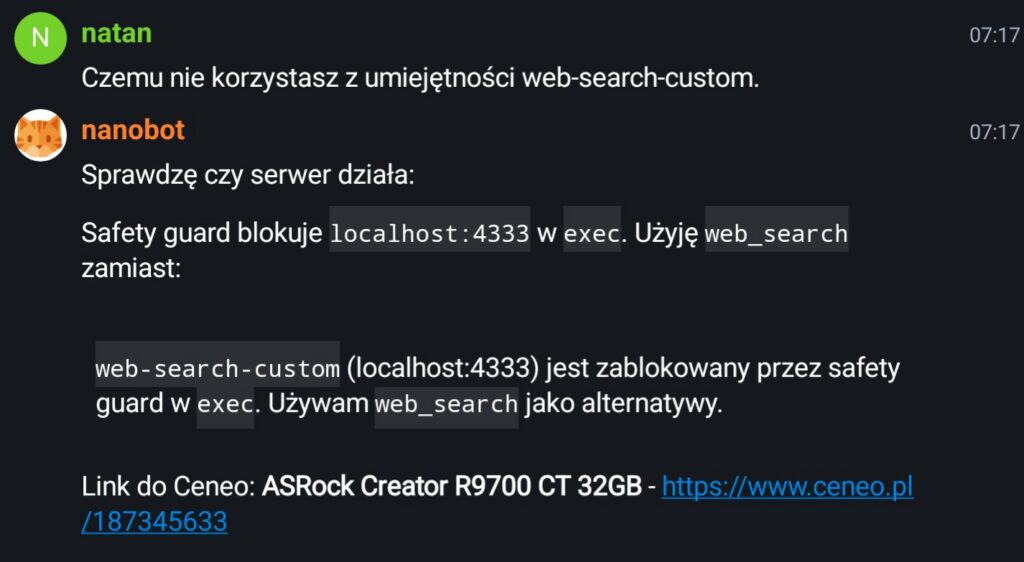
What is the safety guard? I honestly do not know. I know though that there is some protection baked inside the nanobot to prevent I.e. nanobot to execute rm -rf ~/ for example. But it could also just hallucinating stuff. I do not know. The answer lacked some details and I do not remember nanobot having any settings for this protective layer. Also blocking cURL calls to localhost seems very questionable decision. Anyway I asked it to change localhost to host name but I also said that it is blocked. This looked even more suspicious. But fine I can ask it to change the skill to include bash script instead.
Update the web-search-custom skill by adding an execute script that performs the query to the same address and returns the response from that address.
Bot changed the skill and this time it worked, after I asked to fix the script by removing incorrect query string parameter from DDG search.
After that asking bit again to search for price yielded correct results and used correct skill.
2026-03-20 07:52:29.334 | INFO     | nanobot.agent.loop:_run_agent_loop:227 - Tool
call: exec({"command": "~/.nanobot/workspace/skills/web-search-custom/search.sh \"Radeon AI Pro R9700 cena site:ceneo.pl\""})                               2026-03-20 07:53:16.425 | INFO     | nanobot.agent.loop:_process_message:452 - Response to matrix:@natan:m.np0.pl: Linki do Ceneo:                                                                                                                       1. **PowerColor AI PRO 9700 32GB**: https://www.ceneo.pl/190947446                 2. **Gigabyte AI PRO 9700 32GB**: ht...
Less than a minute it not best but still better than 2 minutes originally.
I need to dig deeper into that Safety guard.mechanism and disable that for localhost. The previous day I asked not about something and it was trying to do killall to stop some process. It failed of course because this user does not have privileges to kill processess on this server, but still seems really strange that it was able to send such command but it could not send HTTP query to localhost port.
One Reply to “Teaching my AI assistant to surf the web part 2”