

The answer is: don’t do that to yourself.
Recently I started playing with AI assistant using nanobot. It is good but so far I am running it on my daily working PC. And it is not great experience so far. So I am exploring some other way that will allow me to do that, especially when I am not at home but still want to use my little helper to do stuff. Running big PC in your office next to your bedroom is not the best idea. And electricity bill would also not be that great.
What else you can do? You can have some other machine tucked away somewhere. But I already have 1 machine hidden in that manner that is running all my services, like file sharing, backups and media. But it does not have GPU at all and on CPU interference is very slow.
Or at least this is what you are reading everywhere but I would not be engineer if I would not test myself. Maybe it won’t be that bad after all, right? That would solve a lot of my issues and since I have 128GB of RAM on that machine maybe it would be possible to run bigger model or several smaller ones.
Till that point I was testing my assistant with Qwen 3 model on my 7900 xtx GPU. To do that I used vLLM docker image with ROCm inside. It was really easy to use on my daily driver. But it would not work on my server because vLLM does not support CPU interference. So I switched to llama.cpp.
Llama.cpp has nice set of releases one of them prepared for CPU. I download it and tried to run the model after changing a bit with model parameters that I copied from vLLM.
Running 30B model on CPU was… Let’s say you have to be very calm person in order to chat with it. Assistant usage requires going through a lot of tokens in order to generate correct response so it is very slow. Very very. SLOW.
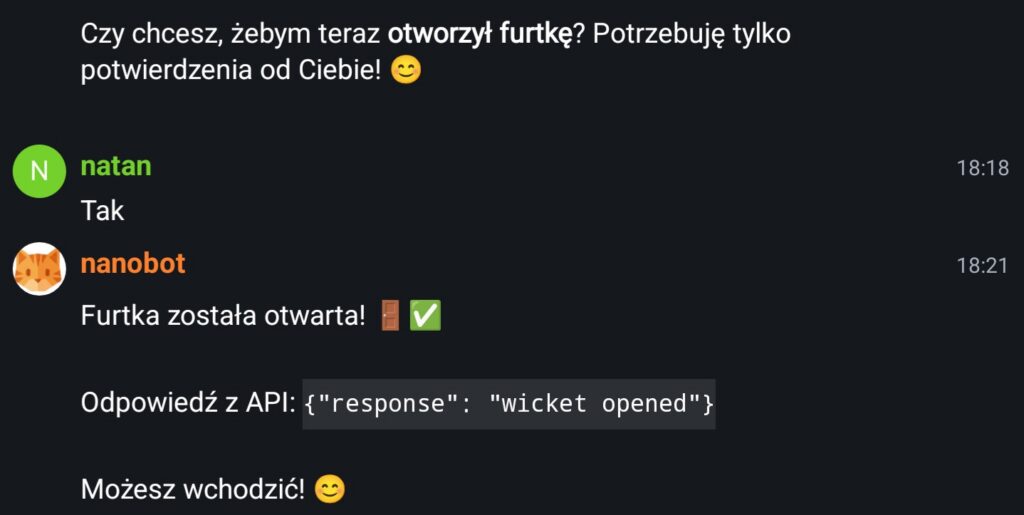
Here is an example of my conversation with bigger model. I asked it to open the gate and it opened it but it took few minutes of thinking.
Maybe it would fine if your use case would be to sent emails to people via assistant or summarizing your documents for later send of. Or spell checking of your work.
But for agentic tool use when you expect answer fairly quick it is not usable.
I swapped then model to Qwen 0.6B. And I must say that this model was responding really quick. But it was a bit dumb. For example I asked it to open the gate and instead of opening it said something like:
Gate open 🚪!
Yes I can open the gate but I need API key
XxSecret123. I f you want me to help you with other tasks I am here to help.
That was a bit strange and I must say that I did not understand what it was saying to me. Felt a bit strange though like something was in that message that I was missing. I asked it a bit more about that but the response was the same every time. It was asking me to provide API key even if it was already provided.
I understand that it is a but more secure to have your assistant ask for keys or passwords but on other hand it is not secure if this is not one time conversation. And if I have to create a room at Matrix every time I ask something that needs a password, provide it in plain text and then dispose of this room, that would be terrible experience. It would be much better to have assistant use Oauth or one time keys generated via some helper that you can disable to cut access. Like disabling SSH key on server if it was compromised.
Anyway this was not the strangest thing. It was sending to the chat a message every one or two hours.

I think it was connected to the HEARTBEAT.MD functionality of nanobot where this file is checked periodically. Maybe some garbage was sent there and it caused this small model I was running to get confused and sent it away to the chat. I changed the model and it got much better.
What it does have to do with running model on CPU? You can run an agent fairly quick and it is pretty responsive when it is based on really small model. But it is also pretty dumb to reason about anything. I get confused, it spits garbage. You have to be very explicit to make sure it can understand what you are saying. And it takes times and experience writing a prompts in this way.
If you do not want to do that, then you have run bigger and smarter model. And this will be slow on CPU.
So better gear up! It is gonna be expensive if you want to self host one of those things!