

Jet Brains have their own coding agent. Since I am already using Rider and all coding agents are pretty slow and inefficient with what they do I wanted to test if Junie have better integrations with IDE which would make things much faster.
For example if you will have following unused namespace in Rider.
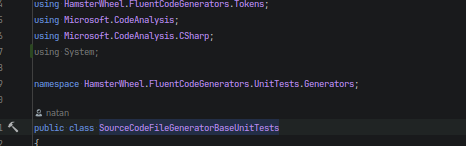
Removing it all cleaning all unused namespaces in entire project or even entire solution is just few clicks away. Or key strokes.
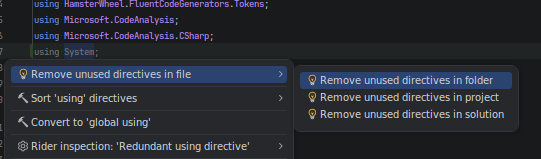
Since Junie can be integrated with Rider and can be used from pipeline it would be cool to have headless IDE instance startup, integrate in CLI coding agent and perform auto cleanup of code, auto packages update or even auto Tests write for better Code coverage.
I wanted to test if this will work with local model.
Configuration
According to the docs, you need to install Early Access version of Junie to have this configuration even available. You can install it via:
curl -fsSL https://junie.jetbrains.com/install-eap.sh | bash
But honestly I advise you to do not do installations this way ever, unless you have absolute trust into source address and your network connection settings.
cd /tmp
wget https://junie.jetbrains.com/install-eap.sh
#inspect the file for validity
bash install-eap.sh
After installation you can run it and play with it a bit if you have Jet Brains account. If not create first the local model config.
You can do that globally or per project. To do that globally use following path:
$JUNIE_HOME/models/*.json
For example I did create file called:
~/.junie/models/llama-swap-global.json
with fallowing content:
{
  "baseUrl": "http://local:8080/v1/chat/completions",
  "id": "medium:instruct_reasoning",
  "apiType": "OpenAICompletion",
  "extraHeaders": {
    "X-Custom-Source": "Junie"
  },
  "fasterModel": {
    "id": "small"
  }
}
Just to know if this will work I created similar file in my personal project, FluentCodeGenerators.
fluentcodegenerator/.junie/models/llama-swap1.json
Content of the file was the same.
When I start junie and use /model command, I can see following menu entry:
    Junie   v.1468.8 eap  ~/.nanobot                                                                                                                                                                                                                                                                                                                                                                                                                           ───────────────────────────────────────────────────────────────────────────────────                                                                                                                                                                                                                                Select model                                                                                                                                                                                                                  Current model: llama-swap-global                                                                                                                                                                                                                                                                                                                                                                                                                            Name                        Input    Output               Effort      Provider                                                                                                                                                ───────────────────────────────────────────────────────────────────────────────────
Default (Gemini 3 Flash)    $0.50    $3.00 per Mtok     ‹ High ›      JetBrains AI                                                                                                                                            Claude Opus 4.6             $5.00    $25.00 per Mtok    ‹ Low ›       JetBrains AI                                                                                                                                            Claude Opus 4.7             $5.00    $25.00 per Mtok    ‹ Low ›       JetBrains AI                                                                                                                                            Claude Sonnet 4.6           $3.00    $15.00 per Mtok    ‹ Low ›       JetBrains AI                                                                                                                                            Gemini 3.1 Flash Lite       $0.25    $1.50 per Mtok     ‹ High ›      JetBrains AI                                                                                                                                            Gemini 3.1 Pro Preview      $2.00    $12.00 per Mtok    ‹ High ›      JetBrains AI                                                                                                                                            GPT-5                       $1.25    $10.00 per Mtok    ‹ Low ›       JetBrains AI                                                                                                                                            GPT-5.2                     $1.75    $14.00 per Mtok    ‹ Low ›       JetBrains AI                                                                                                                                            GPT-5.3-codex               $1.75    $14.00 per Mtok    ‹ Low ›       JetBrains AI                                                                                                                                            GPT-5.4                     $2.50    $15.00 per Mtok    ‹ Low ›       JetBrains AI                                                                                                                                            Grok 4.1 Fast Reasoning     $0.20    $0.50 per Mtok     ‹ Medium ›    JetBrains AI                                                                                                                                          → llama-swap-global           $0.00    $0.00 per Mtok     ‹ Low ›
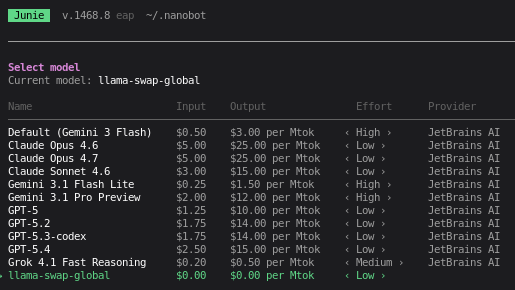
But when I am connected to the IDE with project open:
I have one extra entry.
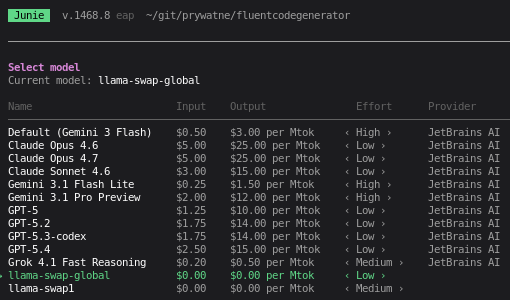
That is it.
Possible problems
I had some strange problem when Junie was not able to see those extra files via in application config. I am not even sure what was causing that and how I fixed that but it seems like couple of restarts of Junie agent, plus renaming the files (llama-swap.json to llama-swap1.json) helped.
You have to bear in mind that performance may vary greatly on your configuration, interference framework, its settings, model kind and of course your hardware. Prepare for at least few days of tuning to achieve workable solution.