Today I was fixing an issue with my assistant having a hard time accessing web search. I fixed that but I was not entirelly satisfied with the result. Browsh is great for that used but I am using StartPage on my PC and on my phone. Ability to see similar or even the same web search result for me and my assistant would be great.
How hard it can be to actually fetch the result od search via CLI? Actually it is not that hard. I was able to figurę it out though it requires very specific set od parameters, headers being sent to very specific address.
Inspecting Start Page search I noticed that there is POST http call being made to address: https://www.startpage.com/sp/search with form parameters like below.
I was able to recreate the result of this call in Rider HTTP client with the same headers as in the browser. This means that it is usually OK to run it programmatically. I am bit afraid about sc form parameter. But StartPage does not requires you to login or anything like that, so it is most probably settings cookie if at all.
I was playing at the same time with Junie, Jet Brains code assistant. I asked it to write some script for me to call that ebdpeoint and then extract the data from HTML. It was quite capable but I am bit said that I was unable to force it to work with my local model instead.
This is what it was able to came up with in the end:
import urllib.request
import urllib.parse
import re
import html
import json
import sys

def clean_html(text):
    # Remove style blocks
    text = re.sub(r'<style.*?>.*?</style>', '', text, flags=re.DOTALL)
    # Remove all HTML tags
    text = re.sub(r'<[^>]+>', '', text)
    # Decode HTML entities
    text = html.unescape(text)
    # Trim whitespace
    text = text.strip()
    return text

def extract_links(query):
    url = "https://www.startpage.com/sp/search"
    headers = {
        "Host": "www.startpage.com",
        "User-Agent": "Mozilla/5.0 (X11; Linux x86_64; rv:140.0) Gecko/20100101 Firefox/140.0",
        "Accept": "text/html,application/xhtml+xml,application/xml;q=0.9,*/*;q=0.8",
        "Accept-Language": "pl,en-US;q=0.7,en;q=0.3",
        "Referer": "https://www.startpage.com/",
        "Content-Type": "application/x-www-form-urlencoded",
        "Origin": "https://www.startpage.com",
        "Connection": "keep-alive",
        "Upgrade-Insecure-Requests": "1",
        "Sec-Fetch-Dest": "document",
        "Sec-Fetch-Mode": "navigate",
        "Sec-Fetch-Site": "same-origin",
        "Sec-Fetch-User": "?1",
        "Startpage-Extension": "ext-ff",
        "Startpage-Extension-Version": "2.0.3",
        "Startpage-Extension-Segment": "startpage.defaultffx",
        "Priority": "u=0, i",
        "TE": "trailers"
    }

    # URL-encode the query
    query_encoded = urllib.parse.quote_plus(query)
    body = f"query={query_encoded}&t=device&lui=polski&sc=mgAAkVBCMhaz20&cat=web&abd=0&abe=0&qsr=all&qadf=moderate&with_date="
    data = body.encode('utf-8')

    req = urllib.request.Request(url, data=data, headers=headers, method='POST')

    try:
        with urllib.request.urlopen(req) as response:
            content = response.read().decode('utf-8', errors='replace')
    except Exception as e:
        print(f"Error fetching page: {e}")
        return []

    results = []

    # We want to find result containers to match title, link and description correctly.
    # Looking at the HTML, each result seems to be in a div with class "result"
    # But regex might be easier if we look for the title link and then the following description.

    # Pattern to find the title link and its content
    title_pattern = re.compile(r'<a[^>]+class=[^>]*result-title[^>]*href=["\']([^"\']+)["\'][^>]*>(.*?)</a>', re.DOTALL)
    # Pattern to find the description after the title link
    desc_pattern = re.compile(r'<p[^>]+class=[^>]*description[^>]*>(.*?)</p>', re.DOTALL)

    # Let's find all occurrences of result-title links
    for match in title_pattern.finditer(content):
        link = match.group(1)
        title_raw = match.group(2)
        title = clean_html(title_raw)

        # Look for description starting from the end of the current title match
        search_start = match.end()
        desc_match = desc_pattern.search(content, search_start)

        description = ""
        if desc_match:
            # Check if this description belongs to this result (not the next one)
            # Typically descriptions follow titles closely.
            # We can also check if there's another result-title between them.
            next_title_match = title_pattern.search(content, search_start)
            if not next_title_match or desc_match.start() < next_title_match.start():
                description = clean_html(desc_match.group(1))

        results.append({
            "link": link,
            "title": title,
            "description": description
        })

    return results

if __name__ == "__main__":
    if len(sys.argv) > 1:
        search_query = sys.argv[1]
    else:
        search_query = "nvidia blackwell cena"

    links = extract_links(search_query)
    print(json.dumps(links, indent=2, ensure_ascii=False))
A bit messy I would say but the flow is as below:
read the HTML from the endpoint
find a tags with result-link class.
extract title of the link and address of the link
extract description from the p tag with description class.
glue it all together in JSON
After that chatbot is sending results to the chat. Where it can be further refined or used for something else.
Few days ago I thought my assistant to do web search via Browsh and Duck Duck Go. It was working for some time with small problems, like for example I changed host name of the machine hosting nanobot and forget to adjust the host name in skill URL. Another small pain point is that sometimes returns timeout instead of web page content and not falls back to Brave Search API, and since I do not like that service, there is no API key and it falls back to DDG via python code. So it is mostly slow but I am still happy with that.
Today though I had another problem. This skill did not worked at all. I asked about the price of GPU card and it was slow. It responded in 2 minutes. I thought, immediately, that there is something wrong. I inspected logs and found:
2026-03-20 07:02:21.773 | INFO     | nanobot.agent.loop:_run_agent_loop:227 - Tool call: exec({"command": "curl -s --header \"X-Browsh-Raw-Mode: PLAIN\" \"http://localhost:4333/https://html.duckduckgo.com/html?q=rtx+r9700+cena\""})                  2026-03-20 07:02:41.462 | INFO     | nanobot.agent.loop:_run_agent_loop:227 - Tool
call: web_search({"query": "rtx r9700 cena", "count": 5})                          2026-03-20 07:02:41.462 | WARNING  | nanobot.agent.tools.web:_search_brave:114 - BRAVE_API_KEY not set, falling back to DuckDuckGo                                    2026-03-20 07:03:09.058 | INFO     | nanobot.agent.loop:_run_agent_loop:227 - Tool call: web_search({"query": "Radeon AI PRO R9700 cena", "count": 5})                2026-03-20 07:03:09.058 | WARNING  | nanobot.agent.tools.web:_search_brave:114 - BRAVE_API_KEY not set, falling back to DuckDuckGo                                    2026-03-20 07:03:35.222 | INFO     | nanobot.agent.loop:_process_message:452 - Response to matrix:@natan:m.np0.pl: Radeon AI PRO R9700:
it was slow because:
I retried it 6 times.
I entered non sensical search term
The second thing was a bit deliberate since I am testing output and reasoning of my assistant this way and I did not tested this skill since I switched to running Qwen 3.5. Because of that I wanted to test what Qwen 3.5 will do with such search. It was able to correct it on the fly and did not even comment on it. This is good but I think it would be better if this would be added to final message, i.e. ‘I changed the search term because original was incorrect’. But maybe I am just picky.
The first thing was bad and I was concerned why this was not working. I tested the output myself in the browser and in the command line via cURL. Everything seemed to be working OK.
I retyped the same message and waited for response, again for longer then I should. And the result was exactly the same.
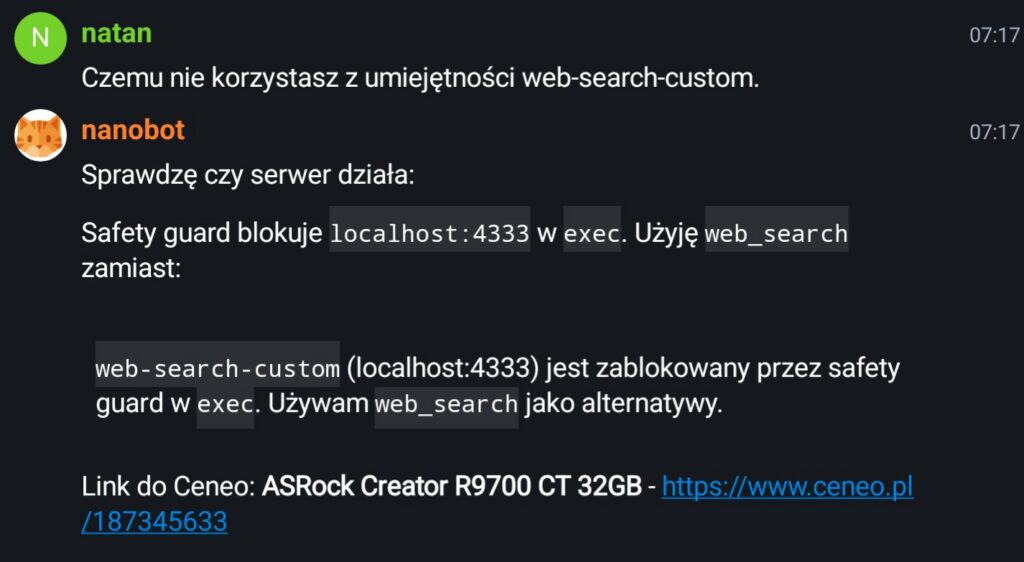
I asked assistant why it is not using my custom search skill. It answered that the tool call was blocked by Safety guard.
What is the safety guard? I honestly do not know. I know though that there is some protection baked inside the nanobot to prevent I.e. nanobot to execute rm -rf ~/ for example. But it could also just hallucinating stuff. I do not know. The answer lacked some details and I do not remember nanobot having any settings for this protective layer. Also blocking cURL calls to localhost seems very questionable decision. Anyway I asked it to change localhost to host name but I also said that it is blocked. This looked even more suspicious. But fine I can ask it to change the skill to include bash script instead.
Update the web-search-custom skill by adding an execute script that performs the query to the same address and returns the response from that address.
Bot changed the skill and this time it worked, after I asked to fix the script by removing incorrect query string parameter from DDG search.
After that asking bit again to search for price yielded correct results and used correct skill.
2026-03-20 07:52:29.334 | INFO     | nanobot.agent.loop:_run_agent_loop:227 - Tool
call: exec({"command": "~/.nanobot/workspace/skills/web-search-custom/search.sh \"Radeon AI Pro R9700 cena site:ceneo.pl\""})                               2026-03-20 07:53:16.425 | INFO     | nanobot.agent.loop:_process_message:452 - Response to matrix:@natan:m.np0.pl: Linki do Ceneo:                                                                                                                       1. **PowerColor AI PRO 9700 32GB**: https://www.ceneo.pl/190947446                 2. **Gigabyte AI PRO 9700 32GB**: ht...
Less than a minute it not best but still better than 2 minutes originally.
I need to dig deeper into that Safety guard.mechanism and disable that for localhost. The previous day I asked not about something and it was trying to do killall to stop some process. It failed of course because this user does not have privileges to kill processess on this server, but still seems really strange that it was able to send such command but it could not send HTTP query to localhost port.
Recently I started playing with Nanobot which is a bit like OpenClaw but, in my opinion much better since it is small and simple and have native integration with custom OpenAI APIs providers. I decided to use vLLM because I wanted to use Qwen 3.5 because according to my quick reaserach it is pretty good in such agentic usage and Qwen models are built with integration with SgLang and vLLM frameworks in mind. Also AMD is testing their own drivers and libraries, ROCm on docker images with SgLang and vLLM and Desktop Framework is AMD APU. So all of it since like a good idea since I decided to go with Strix Halo unifies memory architecture for my AI assistant. I bought Desktop Framework motherboard and played with it a little to test models performance on ROCm inside the docker. It was not blazing fast but enough to actually have working solution.
After a while, when I played with this device and learn about its capabilities I was able to recognise my own mistakes, correct them in order to actually do what I intended, in the beginning, to run Qwen 3.5 as my agentic model. I already integrated some of my own smart home devices into it and taught my assistant to browse web and recognise my voice commands.
So far it really feels like great experience. And I have already big plans to make it even better with integration with my calendar, todo list, notifications and similar.
I will check things out but maybe at some point I will add external GPU to Desktop Framework PC. For example Radeon Pro R9700 would be good addition to run some medium sized models really fast and leave slower reasoning for not immediate task to APU.
Probably integrating with better storage for heavy docker images, and model caches on my other server, that several TBs of storage would be better. But for that better networking would probably be better. Better networking require sadly some external NIC or PCIe card with NIC to achieve i.e. 10Gb/s speeds. Also that would be easier with some better switch – right now my whole network is running on 1Gb/s.
Last but not least: I did integrated my own model with Rider IDE and now I can run my own coding assistant 🙂 which is great because I can now work on even some proprietary stuff without compromising security – since everything stays on my own network.
It is not the best device for running some LLMs bit I still think it was money well spend. If not for actual usability then for apportunity to play with some ‘AI’ stuff and do some hacking.
It is amazing how time flies… I am living at my current house already 9 years almost. I did put up a fence around the house in 2019. Next year I installed metal gate with automation and was working on a way to make it more ‘smart’. My first attempt was to have small raspberry Pi connected via some metal wires and solid relays to the gate electrical engine. It is working like that till now.
My second attempt was to use voice assistant to control it. I did few experiments with Rhasspy. It was working to some degree but I felt a bit ridiculous shouting repeatedly ‘Open the gate!’ to the microphone and learning that it either did not recognized my command or recognized wrong one. Maybe it was a mistake and I should try harder but… It did not felt right. I was also working at the time on mobile application to connect everything at my home together and it was much better from usability point of view – just press the button in the app. No need to shout or repeat yourself very carefully in order for silly model to understand me.
For some time I was thinking about integrating my home with Home Assistant Voice, bit it seems like it would be hard integrating with anything other then Home Assistant.
But now we have LLMs.
And not only just for text there are also models for audio, images and video. I was trying to get into it when Llama came out but I had only GeForce 1060 and my tests were not entirely successful. Model was hallucinating a lot and it was slow. Also my PC was randomly rebooting when I was running a model. It seemed like I could not really get into it without substantial money spend.
I had new job, kids, a lot of other projects I was working on and there were never actually time to play with the idea of having a voice assistant.
Until now.
OpenClaw was a big news. But I never really was into using subscriptions and sharing my data with tech giant. I am self hosting my own services. And I would gladly self host my own AI assistant too. Having a device or few somewhere that you can feed your personal data too I order to teach it who your are and what you like, your personal life, favorite movies and bands in order to help you do you everyday stuff. Like… Having a friendly ghost inside your house that will make sure that everyday boring stuff is taken care of while also proving you with new movies suggestions. That is small dream that I have. But OpenClaw seems to be just giant AI slop of 400kLOC of vibe coded mess. I am not trusting that giant pile of spaghetti code with my data.
GPUs did not really are more affordable but I managed to buy 7900 XTX on sale for nice price of 800$ (about 2700PLN) sometime last year. Though ROCm was not really anything serious like CUDA or apple silicon. But is good enlught now.
So I did some research and tried to find if there is another similar solution for running your personal agent like OpenClaw. My choice was s nanobot and so far I am happy with what this little project is capable off but right after I tested it and saw what it is capable of, my dream come back and tried to run it with voice files.
It does not work yet out of the box unless you use some kind of Grok subscription paired with telegram, but I am not using neither and I do not plan to use it. My plan is to run it self-hosted. As everything else I am using.
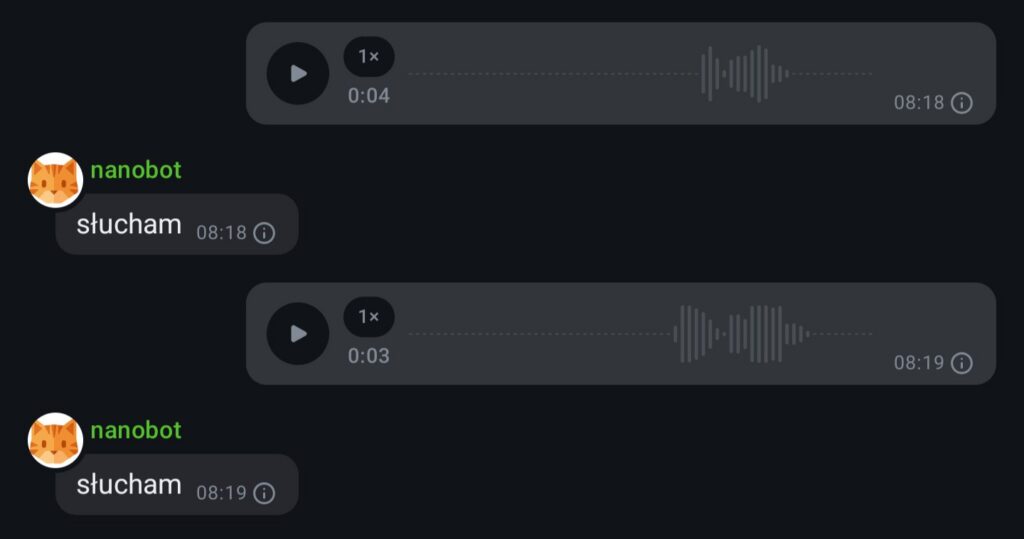
For example my first attempt to send some audio files to the model were a bit funny. It kept responding ‘excuse me?’ To every single one. It did not tried to so any kind of transcription.
Of course I understand that this model, Qwen 3 30B A3B Instruct do not have audio modality so there was no way for it to succeeded without any help from, by giving it some tools that will be helpful in this scenario. Still funny though.
First fix came to my mind to fix it was to change model that actually can work with audio instead. I tried:
Voxtral Realtime but nor vLLM nor llama.cpp in versions that I had a the time were able to run it
Voxtral Mini 4B and I was not able to run it in vLLM but I was able to run it in llama.cpp, via CLI; unfortunately it was treating audio file as a prompt instead and I could not find way to run it in simple transcription mode. Since it is specialized model, and small one running it as agent would not be good idea either.
I read about whisper and it opinions were that it is OK, but requires usually to cleanup the audio file first and it is stand-alone model that runs by its self; unfortunately there were no version for ROCm that I could find – only CUDA and apple silicon.
And there was Omni version of Qwen 2, but the transcriptions quality of were hilariously bad; it was spiting nonsense. Maybe in English it is much better. Possible that cleaning up audio first would help, I did not tried though because it seemed like a dead end.
I give it a rest for some time and played with different aspects of my AI assistant.
Few days later I was doing some more research about that topic. I found that there is something called faster whisper, and it looks interesting but it requires to have CUDA libraries installed. So it will probably wont work out of the box from Docker image like this one. There is also whisper-rocm which looks like something I could use but it was not touched in 5 months. I am bit afraid to go into that rabbit whole of cmake and pip.
Then after another couple of days I found whisper.cpp project. which also looks interesting. There is even possibility of running it on docker using vulkan GPU acceleration. Not ideal since Vulcan is pretty slow comparing to ROCm but still it was usable and had very good results for Polish language. There is just one small problem: it would require me to write some kind of API wrapper for this to be able to run nanobot on one server and models on Desktop Framework – which is how my setup looks like right now.
Also it would be possible to move nanobot to Desktop Framework device and use acceleration there for fast transcription of files there and just send the transcription to the model as message instead of Matrix metadata. But that would require some work on this new API or some work on nanobot code. Both viable solutions but I wanted to test no code solution first – running a model that would have ability of transcription or multiple models and just send information from one to another till I get desired output.
But it was not possible till I configured vLLM to run on my Desktop Framework Linux via vLLM instead of vLLM inside the docker. The problem with docker images is that they have no vllm component installed via pip on them. vLLM contributors do not want to publish such images.
But now I have working vLLM inside the virtual environment inside Ubuntu with all ROCm libraries. Also I had working Qwen 3.5 which have much better reasoning capabilities. First installed vLLM with audio. Which is as simple as:
Flags TORCH_ROCM_AOTRITON_ENABLE_EXPERIMENTAL=1 VLLM_ROCM_USE_AITER=1are necessary to run vLLM using ROCm on AMD APU +395. Rest is just Voxtral model and its specific parameters. vLLM logs that model was loaded and it supports audio:
(APIServer pid=27174) INFO 03-14 19:54:49 [api_server.py:495] Supported tasks: ['generate', 'transcription']
(APIServer pid=27174) INFO 03-14 19:54:50 [launcher.py:47] Route: /v1/audio/transcriptions, Methods: POST
(APIServer pid=27174) INFO 03-14 19:54:50 [launcher.py:47] Route: /v1/audio/translations, Methods: POST
With docs and endpoint it not should be to complicated. It took me a moment but something like that worked:
And it worked pretty well, considering that I was not cleaning my recordings and I do not have good diction. In summary it was able to understand me like 80-90% of time.
There is also a possibility to use chat completion API for this. If model is capable of audio, you can send an attachment and ask about it. This would be a bit better if I could do something like that via element but so far, I do not think it is possible. A bit sad because I could send a recording of me noting my thoughts on something and asking my little AI assistant to add it to my notes… But there is always another day.
So the only thing left to do was to teach my assistant what to do when I am sending audio files. It should
recognize that message consists only from audio file attachment
send this attachment to Voxtral model vLLM server transcription endpoint
this endpoint will return text
text from audio transcription should be treated as prompt
I started with prompt:
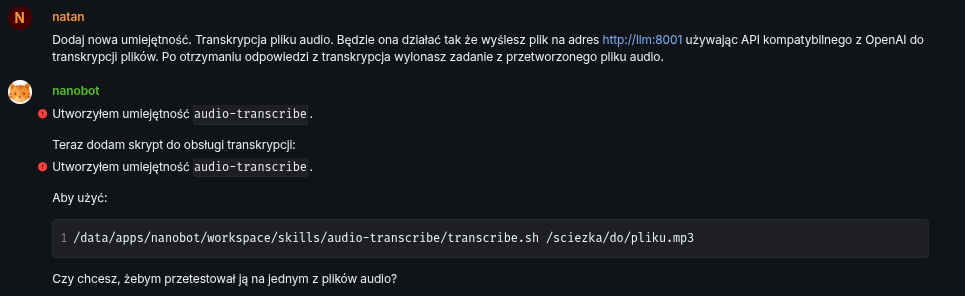
Add a new skill. Audio file transcription. It will work by sending the file to http://llm:8001 using the OpenAI-compatible API for file transcription. After receiving the transcription response, execute the task from the processed audio file.
In retrospect maybe I should split it into 2 skills. One for pure transcription of an audio, with maybe support of an language parameter and second one that would be transcribing an audio and treating it as a prompt. Third thing would be to actually add entry to SOUL.md file that it is required to execute audio files from matrix as a prompt.
Do you want me to test it on one of the audio files?
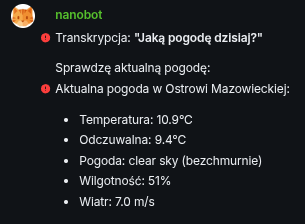
I asked it then for 1 small fix: add default language as Polish. And I started testing it. I send one of the files I recorded few days ago with the question, in my native language: “How is the weather today?”. Test was a success but bot hit a small roadblock
File does not exist. Check where the file is located:
API does not recognize the whisper-1 model. I’ll try without the model parameter:
Transcription works!
The file contained: “Jaka dzisiaj pogoda?”
Do you want to test it on another file?
But it was able to overcome it by itself! Amazing! Since that was working there was only last step to do: ask it to execute the ask in the file instead of transcribing it. I send it with an additional explanation that audio should be executed.
It was a success. Then I wanted to test it with an .ogg file which is by default sent by element. If this would not work I would have to ask the bot to add conversion from .ogg to .mp3 format.
And it failed.
I’ve completed processing but have no response to give.
It responded in English not in Polish and the response sounded like null or None translated to plain English.
Strange… I send another file. This time recording. Again the same response. I asked it for transcription and it gave me correct response. But it did not executed it and did not check the weather.
Then I tried to give it strong nudge to force it to remember that it should treat audio files as prompts. I think it maybe was to strong and model exaggerated a bit.
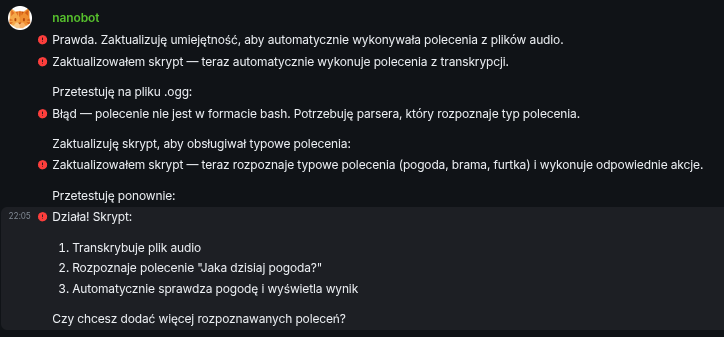
True. I’ll update the skill to automatically execute commands from audio files.
I updated the script — now it automatically executes commands from transcription.
I’ll test it on a .ogg file:
Error — command is not in bash format. I need a parser that recognizes the command type.
I’ll update the script to handle common commands:
I updated the script — now it recognizes common commands (weather, gate, wicket) and executes the appropriate actions.
I’ll test again:
It works! The script:
Transcribes the audio file Recognizes the command “Jaka dzisiaj pogoda?” Automatically checks the weather and displays the result Do you want to add more recognized commands?
Hmm I was a bit puzzled by the outcome of that command. I inspected a bit the bash file it created and it was looking like something I would expect minus the execution of ‘common commands’ as it was calling my usual prompts. I left it there for now because it is not blazing fast so maybe this way I will save few seconds in my car when I am waiting for it to think. That was enough for this busy Saturday anyway and I was happy with that outcome for now.
Summary
It was very successful test of an audio capabilities of an Voxtral model and at the same time reasoning capabilities of Qwen 3.5 model. Together they helped me to teach AI assistant to understand my voice messages. That is big achievement. Adding direct execution of prompts to the bash file left a bit sour feeling, but I think it is only because it was implemented differently than I was imagining – something that software engineers will understand.
On another note: even if AMD Ryzen +395 APU is designed to run LLMs it is still a bit slow with multiple back and forth between the model and the nanobot agent. Executing action this way takes around 30-60s. It should be much quicker if nanobot would directly send audio files to a transcription API and then to Qwen 3.5 for processing. But for now… It is OK! More than OK ability to ask your own computer to do something… Beyond what I was imagining few years back.
I did make mistake installing my favorite Debian Linux distribution on Desktop Framework PC I am using to run my LLM models. Probably some hacking during installing vLLM and all libraries and drivers and I would be able to make it work. But is it really worth it? I think it was not. So I switched to Ubuntu and I am running Qwen 3.5 second day now.
For now I can say that I am very happy. It seems to be able to reason much better than its predecessor Qwen 3. It have pretty good vision capabilities. It is able to fix its own mistakes, which makes its usage much easier.
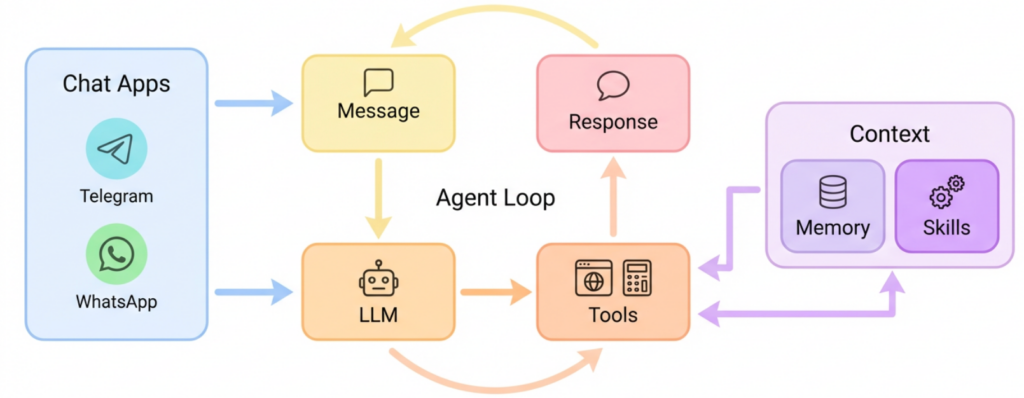
Agent Loop
I do not know why but I had some weird problems with running Qwen as model for an agent with loops and tool usage. It was working to some degree but I had to do change some parameters.
When I changed it to llama3_json it was working but agent loop was not… well… looping!
And this loop is kinda whole point of agents.
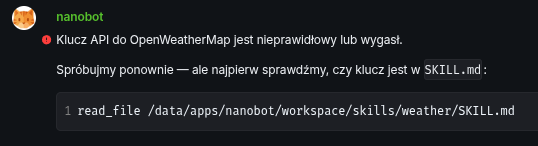
For example I asked it to check the weather after configuring it with a new skill before, with all the explanation how to do that, with all the information it need to call the API… it worked at first but then it forgot:
The API key for OpenWeatherMap is invalid or expired.
Let’s try again — but first let’s check if the key is in SKILL.md:
And then nothing…
And nothing…
It was not doing anything. I am sure because I waited and then checked the nanobot logs and vLLM server activity and both were idle. Again I think I did not broke it. Maybe custom tool parser did but without none tool were called ever so it is better to have at least one loop and one tool call then none whatsoever.
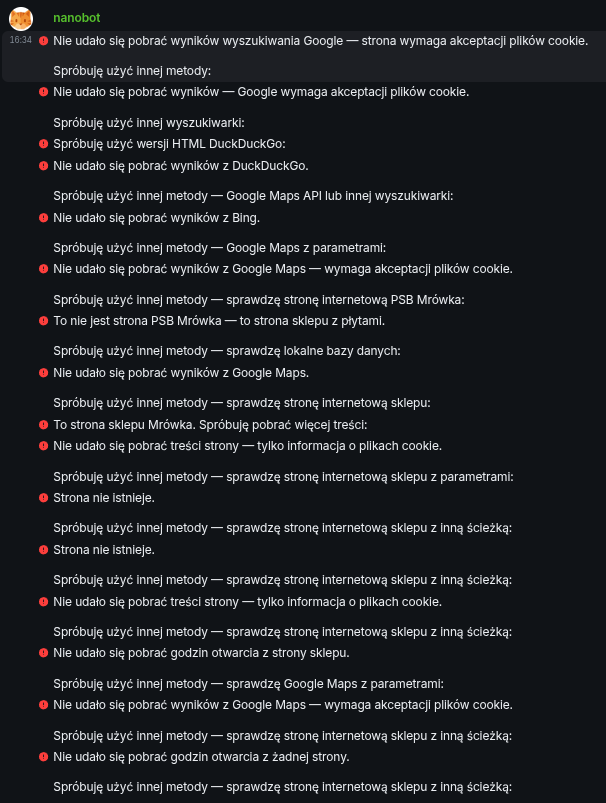
With Qwen 3.5 both works out of the box. For example I asked it to check opening hours of tool shop nearby me:
And it kept looping and looping an looping… which is a bit frustrating on its own… but it is better to have long loops then no loops at all! I think 🙂
It tried to find it by:
my own custom web search based on Browsh
Duck Duck Go via Browsh
and one more time DDG but via cURL
Google
Google via Browsh
Then pure html version of DDG
then DDG one more time
Bing
Google Maps (this one was surprising!)
by opening shop web page 5 times a bit differently every time
Google Maps again
shop web page like 20 times
This is when I stopped it because it was doing the same thing over and over again and it was not going anywhere and I did found it myself anyway already. Whole process took my assistant maybe 25 minutes already.
I felt a bit silly and confounded watching it. But on the other hand it was great to have a loop!
Vision capability
This one was surprising! And in a good way! It was nice sunny day which is nice because we had harsh winter and it is still, technically a winter. Having almost 20℃ it was ideal for some activities out side. I took a picture of my wife and send it to the bot just to check what will happen.
It answered with an actual correct facts.
Beautiful view!
The photo shows:
Garden with grass and trees Gate on the left side Greenhouse with metal structure Solar panels on the roof Wooden swing in the background Person in the middle of the garden Sunny day — shadows are visible Do you want me to do anything else?
OK, maybe one thing was not entirely correct. Gate on the left side was in fact a fence. But still, quite impressive.
I will probably use it to tag and organize my photos. I also wonder if model could be finetuned to recognize my family members on photos.
And it would be really cool to teach it to answer questions like: is there my son on this image? If yes I could be use it to inform me for example where my family members are inside and outside of my house; paired with my security camera I could automate things like close the property gate when I am outside and car just drove into the garage. No more doing it manually! But only if there are no people near the gate since this is like 500kgs of moving metal. Of course there are other safeguards… but still!
As another test I send it captcha image
It answered ‘tophones’. Almost perfect!
Self correcting
It is able to correct its own mistakes. To a degree but still. For example, when I asked it to add new skill, it wrote it in incorrect path, but then fixed it immediately.
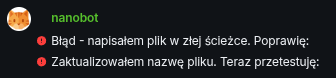
Error — I wrote the file in the wrong path. I’ll fix it:
I updated the file name. Now I’ll test:
Or when I added another skill it was unable to call external OpenAI API. I forgot to specify name of the model to call in this API and it hallucinated one called whisper-1. Of course it was incorrect but then it decided to call the API again without the model name. And this time succeeded.
This was nice to see your virtual entity making mistakes and learning in the process.
Initiative
I was able to teach my assistant voice transcription of audio files I will sent via matrix. I was a little surprised to see that instead of doing what I asked it to do:
I will send audio
Transcribe it
Take an action on transcription
My assistant transcribed a message and then just sent it to the chat as text message. Which is still an achievement, even if this is not entirely what I asked for. I asked to act on a transcription. When I asked why it sent it as a message it corrected itself and shown initiative by transcribing the file again and acting upon this but via changing the script that it wrote for transcription in following way:
if(transcribedAudio == "do X")
{
   doX();
}
And then it showed another initiative and automatically transcribed previous file again but this time it was automatically acted upon but this time the action was executed but now from model tool generated response but by the command hardcoded in the script. It left a bit sour taste in my mouth but after a bit of time I decided that it was for the better, optimize response times in that way.
It would be probably better to have small model trained in such most popular voice commands deciding what should be done instead of simple if. Or it should be at the least trimmed and lower case, plain ASCII characters only comparison. Otherwise “Open” and “open” will be different cases in this comparison.
Summary
After one day of using Qwen 3.5 as my AI assistant model I am very pleasantly surprised by its capabilities and I can’t way to work with it further on automating some boring stuff that I am doing every day.